Abstract
This technical note highlights a streamlined workflow using the BioPhase 8800 driver for Empower software to control setup, operation and data acquisition on the BioPhase 8800 system. It provides seamless acquisition and analysis of capillary electrophoresis-sodium dodecyl sulfate (CE-SDS) and capillary isoelectric focusing (cIEF) data on the BioPhase 8800 system in both research and compliant environments.
Introduction
Monoclonal antibodies have become one of the most successful therapeutic modalities as understanding disease-associated pathways has improved. However, due to increasing molecular, structural and functional complexity, more varieties of analytical instrumentation are needed to characterize molecules and analyze data fully. Therefore, a growing desire exists to operate and analyze data seamlessly to streamline data management in analytical development and regulated environments (GxP). Empower Chromatography Data System is a chromatography data system (CDS) widely used in the biopharmaceutical industry and allows instrument control and data processing from liquid chromatography, mass spectrometry, capillary electrophoresis and other analytical platforms. To minimize the need to train users on multiple software platforms and ensure seamless workflow transfer in a compliant and secure manner, SCIEX developed a driver which allows complete control of the BioPhase 8800 system.
BioPhase 8800 driver for Empower software1 controls the BioPhase 8800 system hardware and data collection, allows for method and sequence editing and stores multi-capillary data in the Empower CDS with linked sample information. After data acquisition, users can analyze the data directly in Empower CDS and apply any necessary electronic signatures on reports using sign-off capabilities.
Key features of the BioPhase 8800 driver for Empower software
- Seamless data acquisition: The driver allows for direct control of the BioPhase 8800 system hardware, including method and sequence editing capabilities
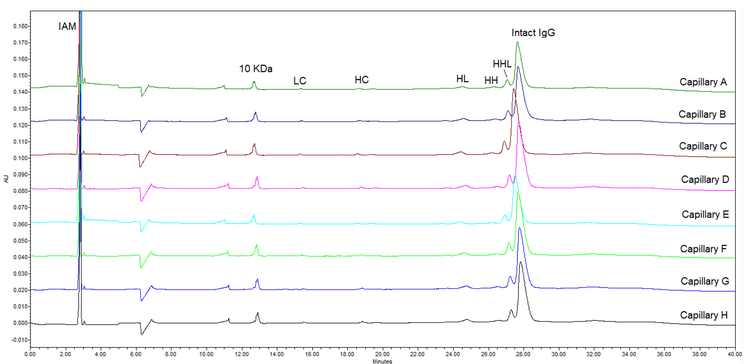
- High-throughput analysis: Multi-channel data acquisition, storage and analysis (Figure 1)
- Data integrity: Direct transfer of data acquired on the BioPhase 8800 system with the ability to apply the 21 CFR Part 11 toolset in the Empower CDS to help satisfy GxP requirements
- Streamlined data management: Facilitate seamless data management from analytical development to quality control
Methods
CE-SDS sample preparation: The IgG Control Standard, 3 pack (P/N: 391734) was from SCIEX (Framingham, MA) and was prepared under reducing conditions. Sample preparation was performed according to the guidelines published in the application guide for BioPhase CE-SDS Protein Analysis kit. 2
cIEF sample preparation: The pI markers were from the cIEF Peptide Marker kit (SCIEX, P/N: A58481). The IgG reference standard (P/N: 1445539) test material was from USP (Rockville, MD). Sample preparation was performed according to the guidelines in the application guide for BioPhase Capillary Isoelectric Focusing (cIEF) kit. 3
Capillary electrophoresis: The separations were performed using the BioPhase 8800 system (P/N: 5083590) from SCIEX. The BioPhase 8800 system was equipped with UV detection using 220 and 280 nm filters for CE-SDS and cIEF separations, respectively. The CE-SDS and cIEF separations were performed using the BioPhase BFS capillary cartridge - 8 x 30 cm (PN 5080121) and the BioPhase neutral capillary cartridge, 8 x 30 cm, 50 μm inner diameter (PN 5080119). BioPhase sample and reagent plates (PN 5080311) were from SCIEX (Framingham, MA). All separations were performed using the pre-loaded methods in the BioPhase 8800 driver for Empower software for capillary conditioning, sample separation and cartridge shutdown according to the instructions in the respective application guides.
Control software, data acquisition and processing: The BioPhase 8800 driver for Empower software was used to control the BioPhase 8800 system. Data analysis and reporting were performed using the tools of the Empower CDS.
Results and discussion
Workflow using the BioPhase 8800 driver for Empower software:
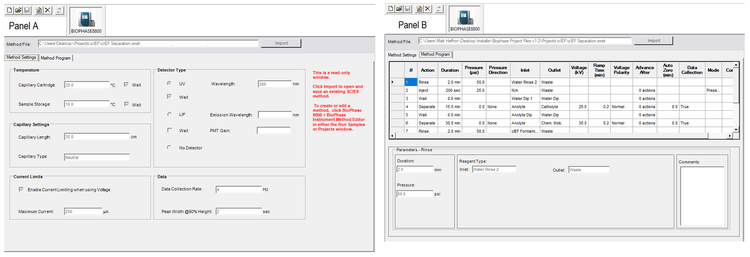
Create a CE method: There are 3 options to create a CE method for the BioPhase 8800 system. Users can download premade separation methods of interest from https://www.SCIEX.com. Alternatively, users can create or open a pre-loaded method using the BioPhase 8800 driver for Empower software. Finally, users can import a read-only copy of the method of interest into Empower CDS using the using the import function (Figure 2).
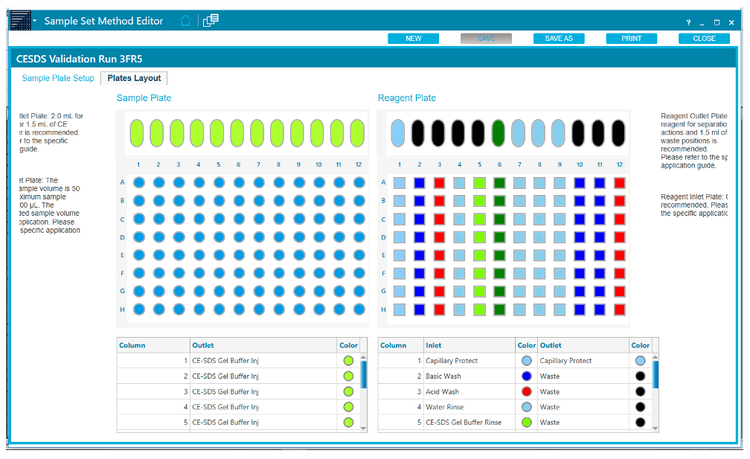
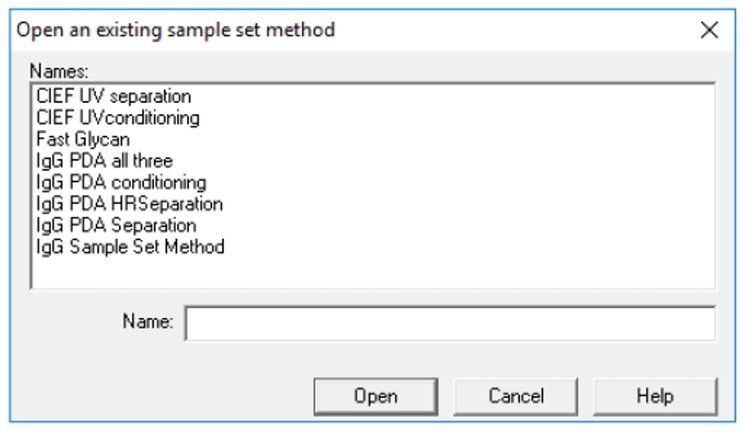
Submit the sample set for separation: The user can follow the functions in the Empower CDS to submit a sample set method, as shown in Figure 5.
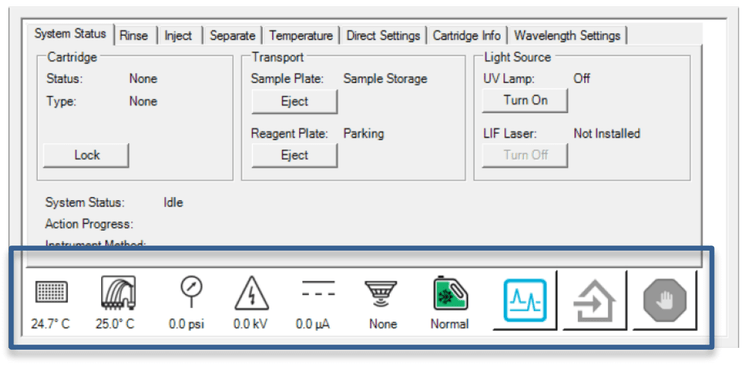
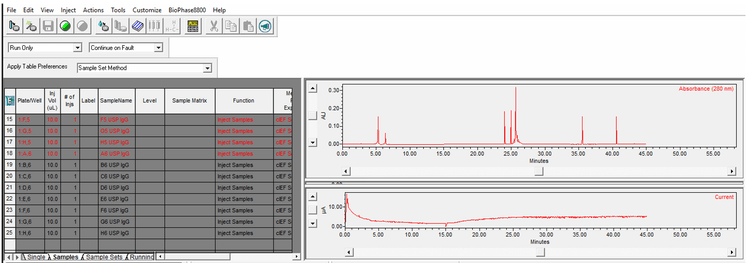
Monitor the separations via direct control: The blue icon at the bottom of the direct control screen (Figure 4) allows users to monitor the separation status by opening the trace view option. The trace view can simultaneously display up to 3 electropherograms. The user can toggle between the optical, current, voltage and pressure traces. The user can also select which capillaries are displayed using the checkboxes at the bottom of the screen. Figure 6 shows the live view of UV absorption and current traces during a cIEF separation.
Analyzing the data, reporting and sign-off: The BioPhase 8800 driver for Empower software allows users to access the resources currently available in the Empower CDS, from data analysis to sign-off.
Multi-channel CE-SDS and cIEF assays using the BioPhase 8800 driver for Empower software
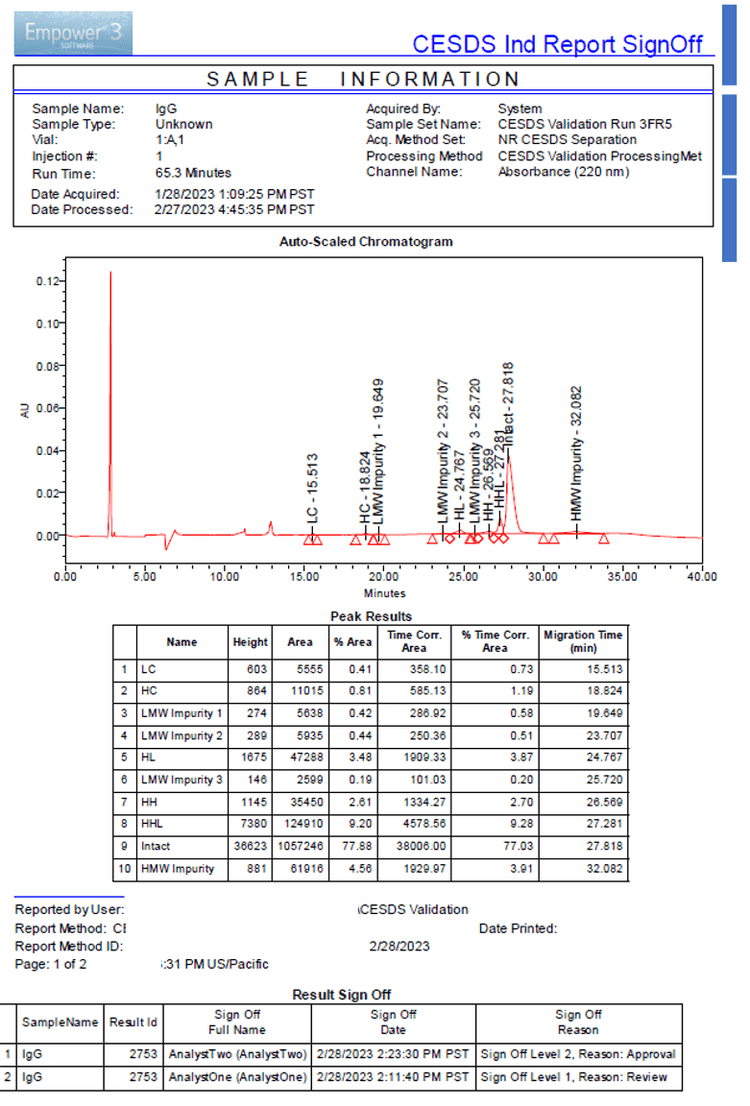
Figure 1 shows a representative CE-SDS separation of the IgG control standard under non-reduced conditions. The data analysis, reporting and sign-off features were performed using the software features in the Empower CDS. Figure 7 shows an example of a report sign-off commonly used in the compliant environment.
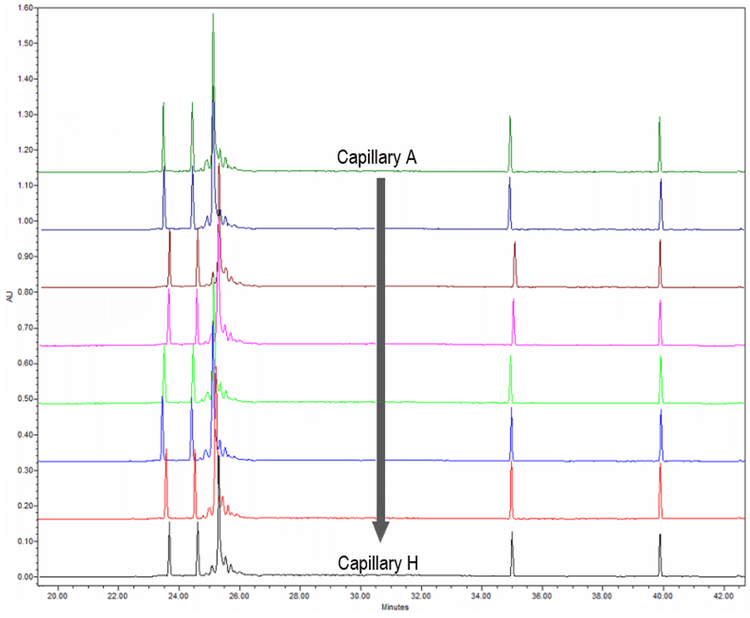
Figure 8 displays representative cIEF separations of the USP reference standard from capillaries A–H collected using the BioPhase 8800 driver for Empower software. These separations are comparable to data previously acquired using the BioPhase 8800 software.
Conclusion
- The BioPhase 8800 driver for Empower software offers complete control of the BioPhase 8800 system to enable multi-channel data acquisition
- Streamlined data storage and analysis are achieved using Empower CDS
- The BioPhase 8800 driver for Empower software allows the use of compliance tools available in Empower CDS to help meet GxP requirements
- Seamless data management from analytical development to quality control is available for both CE-SDS and ciEF
References
- BioPhase 8800 driver for Empower software – operator guide, RUO-IDV-05-15014
- BioPhase CE-SDS Protein Analysis kit - application guide, RUO-IDV-05-8662-C.
- BioPhase Capillary Isoelectric Focusing (cIEF) kit - application guide, RUO-IDV-05-8651-B