Abstract
This technical note describes an introduction to the peptide mapping workflow templates within the Biologics Explorer software (v.1.0.2) along with some of their most common applications. Described are the key differences between the workflows that allow either quick assessment or in-depth investigation. In addition, an overview of the diverse tools for data visualization and interrogation is provided.
Introduction
Peptide mapping continues to play an indispensable role in the development and quality control of biologics due to its ability to characterize, localize and quantify quality attributes. Differences in amino acid sequences and post-translational modifications (PTMs) induced by variations in manufacturing, purification and formulation of biotherapeutics can drastically impact their pharmacokinetics and pharmacodynamics profiles. The increasing complexity of biologics continues to pose significant challenges for their in-depth characterization. As such, novel and rigorous processing algorithms are essential to complement the continuous advancements at the sample preparation and LCMS/MS fronts. 1-3
The Biologics Explorer software is the latest software suite from SCIEX for the comprehensive characterization of complex biologics, in intact or subunit forms, as well as protein digests. Data acquired using the state-of-the art ZenoTOF 7600 system in either collision-induced dissociation (CID) or electron activated dissociation (EAD) mode can be processed. EAD allows for tunable electron energy, producing a varied fragmentation pattern that results in higher level of structural information. The Biologics Explorer software is an advanced software package powered by Genedata Expressionist algorithms, facilitating scientists to maximize the evidence-based information extracted from their rich LC-MS/MS spectra.
In this technical note, Biologics Explorer v.1.0.2 is used for the peptide mapping analysis of adalimumab as a model molecule. The advanced processing capacity of the software for sequence confirmation and identification of low or unexpected PTMs is demonstrated through examples. In addition, the functionality to conduct and visualize comparative investigation is highlighted using samples with reduced and intact disulfide bonds.
Key features of the peptide mapping workflows within the Biologics Explorer software
- Streamlined and easy-to-use: Predefined processing settings, customized for SCIEX QTOF MS and MS/MS data, leverage an accelerated path for the optimization of biologics-specific data processing methods
- New depth of peptide mapping analysis: Distinct workflow structures support diverse analytical biotherapeutic applications, from discovery and development through to production and quality attribute monitoring. Four peptide mapping workflow templates are provided:
1.PeptideMapping_Simple
2.PeptideMapping_Extended
3.PeptideMapping_Comparative
4.PeptideMapping_ReviewSnapshots - Evidence-based decision making: Traceability and transparency in data processing, visualization and review bring confidence and accuracy in decisions made with high efficiency
Methods
Sample preparation
Reduced samples: adalimumab was denatured with 7.2 M guanidine hydrochloride in 100 mM Tris buffer (pH 7.2), followed by reduction and alkylation of cysteine bonds using 10 mM DL-dithiothreitol and 30 mM iodoacetamide, respectively. Protein digestion was performed with trypsin/Lys-C at 37°C for 16 h at pH 7.5. The reaction was stopped with 1% formic acid.4
Non-reduced samples: adalimumab was denatured with 7.2 M guanidine hydrochloride in 50 mM Tris buffer (pH 7.0). Free cysteine residues were capped with 5 mM iodoacetamide. Protein digestion was performed with trypsin/Lys-C at 30°C for 16 h at pH 7. The reaction was stopped with 1% formic acid.5
Chromatography: Detailed method parameters were described previously.4,5 Briefly, peptides from trypsin/Lys-C digests (5 μL, 2 μg) were separated with a CSH C18 column (2.1×100 mm, 1.7 μm, 130 Å, Waters) using an ExionLC AD system. Mobile phase A consisted of 0.1% formic acid in water, while the organic mobile phase B was 0.1% formic acid in acetonitrile.
Mass spectrometry: Data was acquired in positive ionization mode with a data dependent acquisition (DDA) method using the SCIEX ZenoTOF 7600 system. The electron energy for the alternative fragmentation in the EAD cell was set to 7 eV. Detailed method parameters were described previously.4,5
Data processing:Data was processed with the Biologics Explorer software using different pre-built templates as discussed in the next sections.
Overview of the peptide mapping workflows
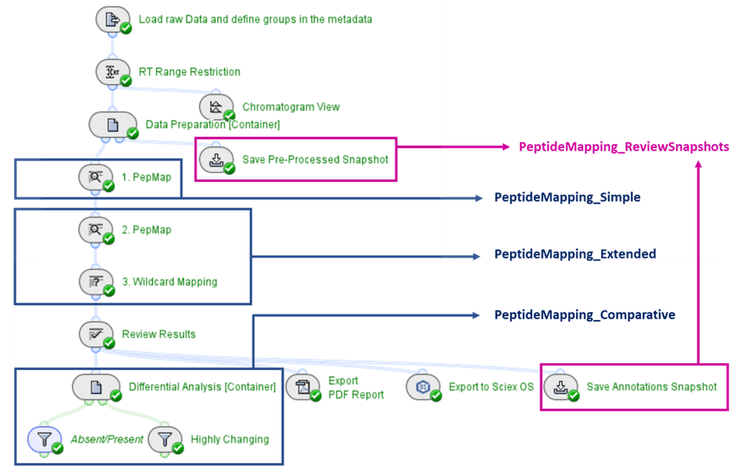
The Biologics Explorer software is prepackaged with 3 main and 1 supplemental peptide mapping workflow template with settings optimized for the processing of protein digests analyzed on SCIEX QTOF MS platforms, including the ZenoTOF 7600 system. All workflows share a common fundamental architecture, where activity nodes are arranged in a chronological order to process data sequentially followed by a Review Results activity node for the interrogation of the compiled results (Figure 1).
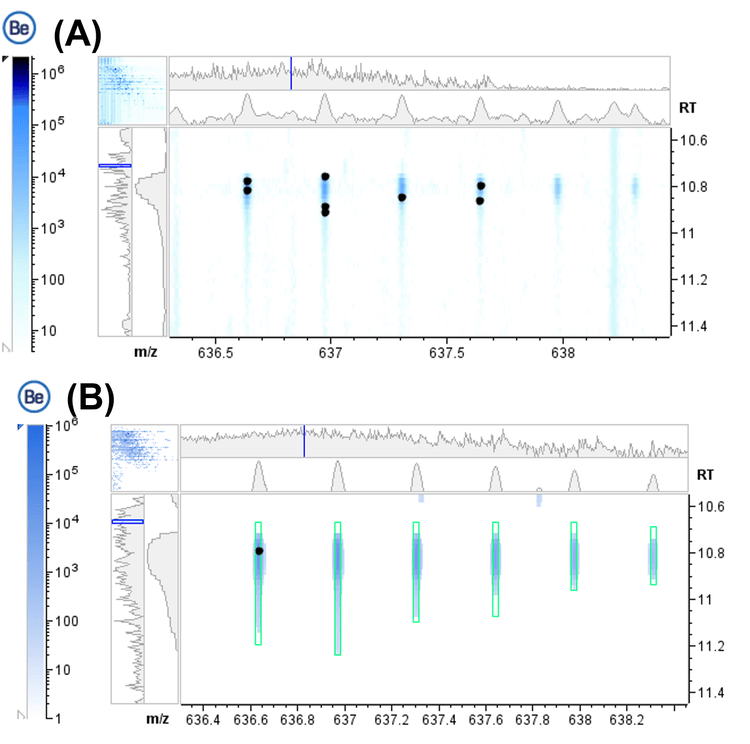
The advanced workflow structure established a stepwise approach to data processing with each activity node, maximizing the data quality and confidence for the peptide mapping stage. At first, noise reduction steps are applied to the data followed by detection of MS peaks, grouping of isotopic clusters, then further grouping of charge states and any additional associated adducts. Subsequent stages include MS/MS peak consolidation and detection, plus deisotoping of MS/MS peaks to further maximize confidence and robustness in the following stages where data is matched to amino acid sequences in in silico for peptide identification and PTM characterization.
The results of each activity node can be visualized independently, whereas data across the contained tables and figures are automatically connected. In addition, results visualization can be synchronized across different activity nodes enabling efficient review during the data processing and analysis stages.
The 3 main ‘PeptideMapping’ workflows (_Simple, _Extended and _Comparative) are designed with an increasing level of complexity to suit different depths of peptide mapping investigations (Figure 1). All workflows contain an Export PDF Report activity node, where different sections of the generated report can be customized to include specifically selected or all input/output details for each activity node. The generated PDF report file can be downloaded and encompasses 2 attachments by default. The first attachment is an excel file of results, which can be tailored as per personal preference for the depth of its contents. The second attachment is a copy of the executed workflow. This .xml file can be effortlessly opened by dragging and dropping it into the workflow preview pane of the software. This is a substantially efficient feature, particularly if workflows are intended to be shared among users, different groups or sites, or revisited at a future timepoint.
All main workflows are also equipped with an Export to Sciex OS activity node, where a tailored .txt list of product quality attributes (PQA) or critical quality attributes (CQA) can be generated and exported to the Analytics portion of SCIEX OS software for performing further multi-attribute methodology (MAM) analysis.
PeptideMapping_Simple workflow
This workflow is designed to provide a quick and efficient peptide mapping overview, for quality checks or during early process development stages. It is suited for assessment of sequence coverage and characterization of common PTMs, including N-linked glycans, which can be identified using the glycan libraries provided with the Biologics Explorer software.
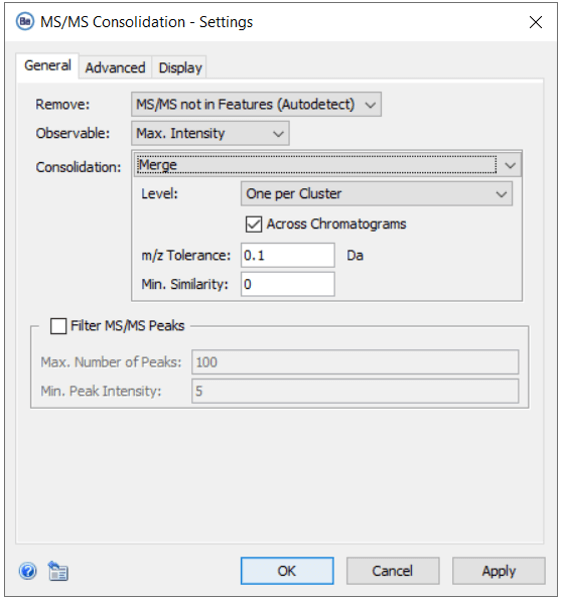
DDA-based MS/MS methods are common practices in peptide mapping. Depending on the user-defined settings for DDA, multiple MS/MS events can be expected from a single precursor ion. The MS/MS Consolidation activity node is set by default to merge multiple MS/MS events to a single spectrum per isotopic cluster (Figure 2). This integration of fragmentation data maximizes the evidence for high confidence peptide identification and reduces both false negatives and false positives events. Within the same activity node, the MS/MS data is further merged Across Chromatograms, with the option to deselect the merging process depending on the sample set and objective of the analysis (Figure 3). If this merging option is selected, the algorithm will consolidate MS/MS spectra for the same feature across the entire sample set and the resulting consolidated MS/MS will be assigned to the sample with the highest intensity MS/MS spectrum. This capability leverages the information from individual spectra to amplify the evidence of peptide fragmentation and generates an enhanced single spectrum for confident and efficient peptide identification. As such, the time needed for manual data evaluation in the Review Results activity node can be substantially reduced.
PeptideMapping_Extended workflow
The PeptideMapping_Extended workflow has 2 additional activity nodes, 2. PepMap and 3. Wildcard Mapping (Figure 1). It has been optimized for the analysis of more complex proteins and in-depth peptide mapping characterization. As an example, a more comprehensive glycosylation analysis is possible if the 1. PepMap activity node is used to identify the usually higher-abundance N-linked glycopeptides present in the sample and the 2. PepMap activity node is used for O-glycan mapping, using either the prepackaged or a customized O-glycan library. By default, the 2. PepMap activity node ignores the features annotated in the prior node, reducing the computational search space and the rates of false positive matching. Nonspecific digestion, conjugates (either entered as molecular formulae or delta loss/gain value) and less common PTMs can be also specified within 2. PepMap.
Wildcard Mapping is a powerful tool designed for discovery purposes where unexpected modification, that are not specified in the processing parameters, are detected under very stringent acceptance criteria. If not required, this activity node (as with others) can be skipped by activating the ‘bypass’ icon associated with the activity node itself. In the following sections an example is given. Here, an expected chemical modification was used as an example to demonstrate how Wildcard Mapping can be used to identify and confirm unexpected modifications within a biologics-specific processing method.
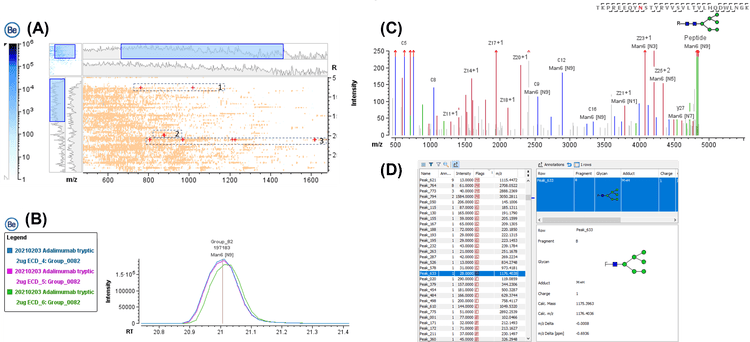
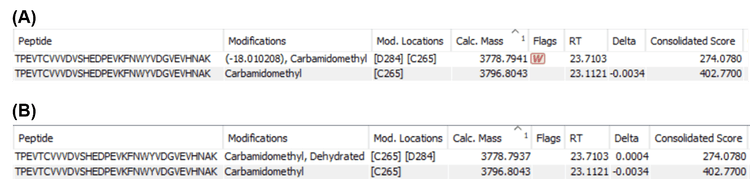
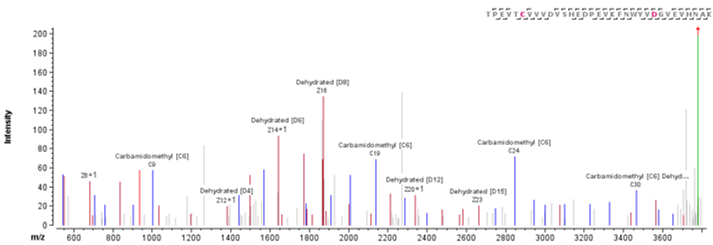
The analysis of the Wildcard Mapping results from the _Extended workflow revealed peptides with an average loss of 18.010±0.005 Da from aspartic acid residues. Using the Modifications Editor tool as a guide to identify possible matches, this PTM could be attributed to the loss of a water molecule arising from nucleophilic attack on the side chain carbonyl carbon of aspartic acid during isomerization, resulting in the formation of succinimide intermediate.6 The next stage following the detection of an unexpected modification is collecting MS and MS/MS evidence. To investigate this representative example further, a selected peptide, TPEVTCVVVDVSHEDPEVKFNWYVDGVEVHNAK, exhibiting the detected mass loss from position D25 was compared to its native form (Figure 5A). A mass shift of 3.601 Da between the monoisotopic peaks of the 5+ charge state of the modified and unmodified peptides is consistent with H2O loss (Figure 6). Additionally, the slightly longer retention time of the modified peptide correlates with the expected increase in hydrophobicity relative to the unmodified D25 peptide (Figure 6).

PeptideMapping_Comparative workflow
The _Comparative workflow is further empowered with dedicated statistics activity nodes for differential analysis (Figure 1). Samples exposed to different stress conditions or sample preparation steps, those acquired during instrument optimization or process development, different lots or manufacturers and how they can efficiently be analyzed using the _Comparative workflow.
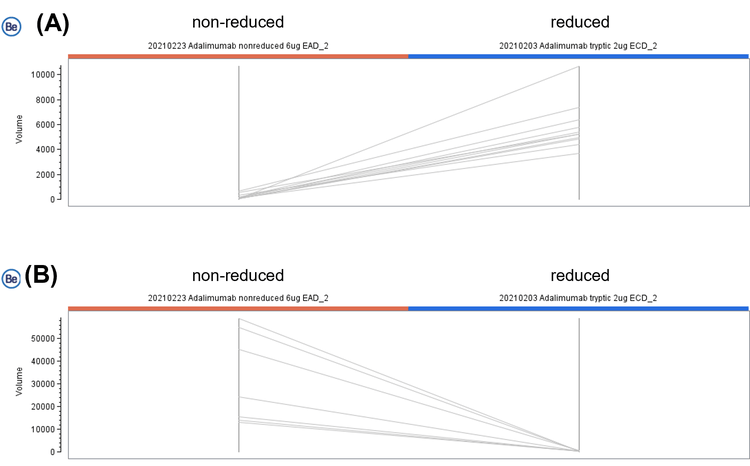
Sample groups can be specified within the metadata editor either in Load Raw Data or in Data Setup activity node. The Highly Changing activity node allows monitoring of the fold change in peptide abundance between samples, where a minimum threshold for fold change can be set depending on the nature of the samples. The Absent/Present activity node on the other hand can be used to investigate new peaks detected in at least 1 sample group (Figure 1). The output results from each activity node are compiled in interactive tables that provide comprehensive details on each identified peak. Furthermore, the data can be synchronized with any of the previous activity node(s) to facilitate traceability. To demonstrate this feature, reduced and non-reduced adalimumab samples were run in the _Comparative workflow template. Peptides with cysteine carbamidomethylation in the former group and peptides with intact disulfide bridges in the latter group were observed, as expected for these samples (Figure 8).
PeptideMapping_Review Snapshots workflow
Finally, this workflow (Figure 9) is designed to open 2 types of snapshots files (.sbf) that correspond to either intermediate (such as, partially processed) data or reviewed (for example, annotation) results generated from the main peptide mapping workflows (Figure 1). To quickly view fully processed and reviewed results, the annotated snapshots can be opened in the racetrack Review Results from Same Batch (Figure 9). On the other hand, partially processed snapshots can be opened in the racetrack Review Results from Different Batches (Figure 9). As such, the same processing parameters and peptide mapping settings can be applied to all samples concurrently. In general, snapshots enable faster analysis times since the contained data is either partially or completely processed prior to being saved as .sbf files. Snapshots also provide a useful means of storing data with a lower memory footprint for further inspection later.
Conclusion
- Workflows with optimize settings maximize the efficiency by which high-quality peptide mapping evidence can be extracted from rich LC-MS/MS data (EAD or CID fragmentation)
- Diverse workflow structures allow for the flexibility to fit various needs while developing or manufacturing biotherapeutics
- Various options available for saving, sharing, reporting and exporting results provide a robust platform for routine high- throughput analysis meeting diverse needs along the pipeline of biologics development
References
- Kim, HoUng, et al. (2020) The future of biosimilars: maximizing benefits across immune-mediated inflammatory diseases. Drugs 80(2): 99-113.
- Chang, Lin-Chau.(2019) The biosimilar pathway in the USA: An analysis of the innovator company and biosimilar company perspectives and beyond. Journal of food and drug analysis, 27(3): 671-678.
- Háda, Viktor, et al. (2018) Recent advancements, challenges, and practical considerations in the mass spectrometry-based analytics of protein biotherapeutics: A viewpoint from the biosimilar industry. Journal of Pharmaceutical and Biomedical Analysis, 161: 214-238.
- Differentiation of aspartic and isoaspartic acid using electron activated dissociation (EAD). SCIEX technical note, RUO-MKT-02-12550-A.
- Confirmation of disulfide linkages in adalimumab using electron activated dissociation (EAD). SCIEX technical note, RUO-MKT-02-12913-B.
- Cao, Mingyan, et al. (2019) An automated and qualified platform method for site-specific succinimide and deamidation quantitation using low-pH peptide mapping. Journal of Pharmaceutical Sciences, 108(11): 3540-3549.