Abstract
This technical note demonstrates the formulation of several quality control (QC) calculations and flagging rules directly within the SCIEX OS software for EPA PFAS Methods 533 and 1633. Using the Calculated Columns feature in the processing method, SCIEX OS eliminates the need to export the data to a third-party software platform, minimizing data processing and review time (Figure 1). In addition, the development of Custom Flagging rules within SCIEX OS allows for the quick review of data outside of the EPA criteria. The flexibility of SCIEX OS is shown, highlighting the ability to adapt to changing QC requirements.
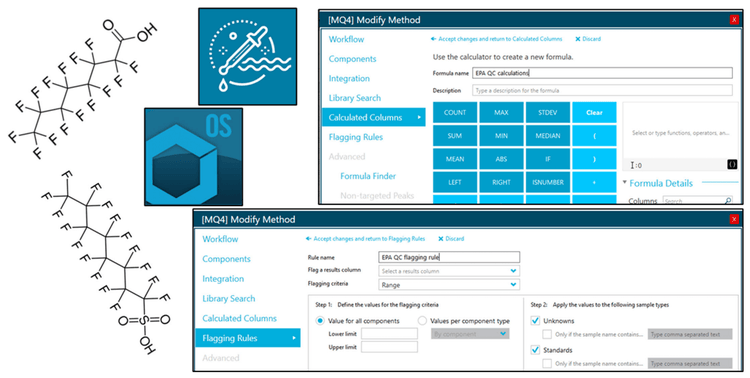
Key benefits of using SCIEX OS calculated columns and custom flagging for EPA PFAS methods 533 and 1633
- Flexibility to build QC calculations for EPA PFAS methods. Calculated Columns feature in SCIEX OS was used to build extensive QC equations for EPA methods 533 and 1633; calculation output directly within Results Table
- Rapidly identify out-of-range QC samples. Custom Flagging rules were developed in SCIEX OS to flag QC samples that were outside of acceptance criteria range
- Data processing and review time saved. Ability to formulate QC calculations and flagging rules directly in SCIEX OS reduces the time spent on data processing and review
Introduction
The US EPA has published several LC-MS/MS methods for PFAS analysis in environmental samples, including EPA Method 533 for drinking water and EPA Method 1633 for non-potable water, solids (soil, biosolids, sediment), and tissue samples.1,2 Both methods contain extensive criteria for initial and ongoing calibration verification, qualitative peak identification and quantitative determination. Performing the required quality control calculations through exporting the raw data into third-party software packages is time-consuming. Further, flagging out-of-range values is labor-intensive and potentially susceptible to error. This technical note highlights the capability of the SCIEX OS software to build custom calculations and flagging rules directly within the data results table, achieving the criteria requirements of EPA Methods 533 and 1633 while reducing the burden of data processing for the analyst.
Methods
Data acquisition. Samples were prepared and analyzed according to EPA Methods 5331 and 16332, and full details are provided in their individual technical notes3,4. Extracts for both methods were analyzed using the SCIEX 5500+ system.
Data processing: Data processing was performed in SCIEX OS software, version 3.4.
EPA 1633: Ion abundance ratio
Ion abundance ratio. EPA Method 1633 specifies that the ion abundance ratio (IAR) must be between 50% to 150% of the IAR in either the mid-point calibration standard or the calibration verification (CV) standard injected at the beginning of the analytical batch (Sections 14.3.5 and 15.1.3). The IAR requirement does not apply to PFBA, PFPeA, NMeFOSE, NEtFOSE, PFMPA and PFMBA since these compounds exhibit only one stable transition. Since, the default SCIEX OS calculation uses all samples defined as “standards” for the ion ratio equation, a custom calculation is necessary to ensure that the EPA 1633 calculation is only applied to the specific samples.
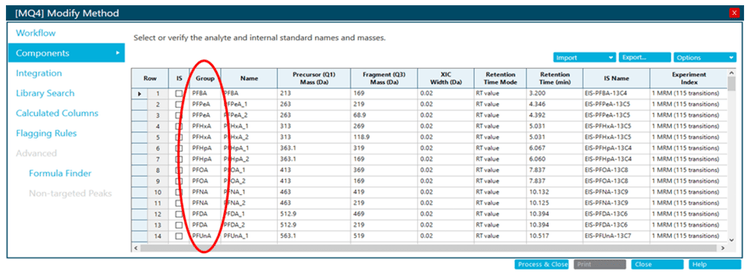
Step 1. The “Group” column must be completed in the Components pane (Figure 2). In the SCIEX OS software, the first row in a group represents the quantifying transition, and the second represents the qualifying transition.
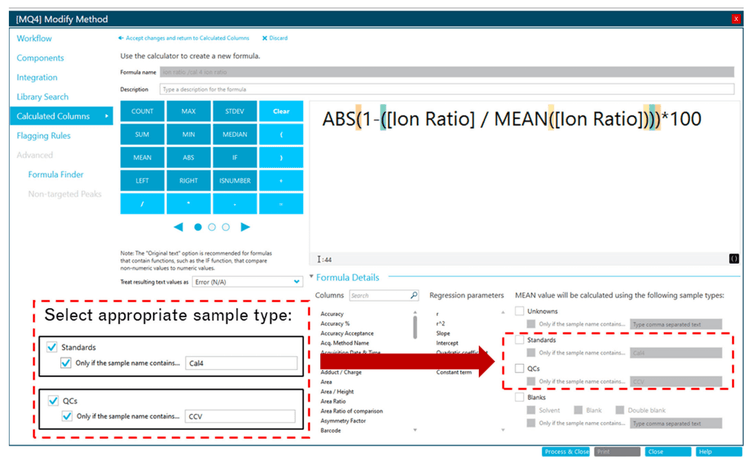
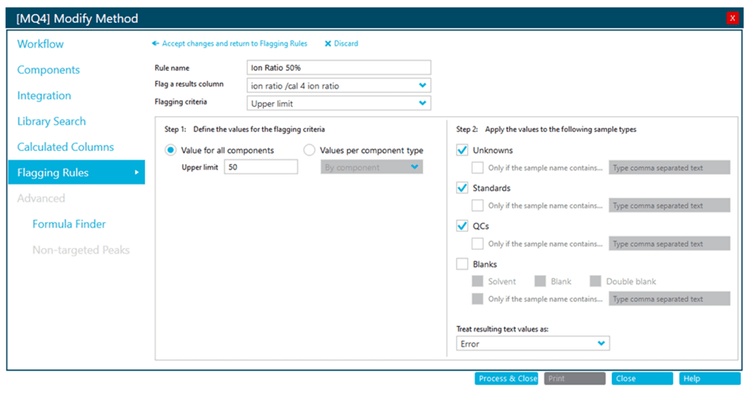
EPA 1633: Retention time verification
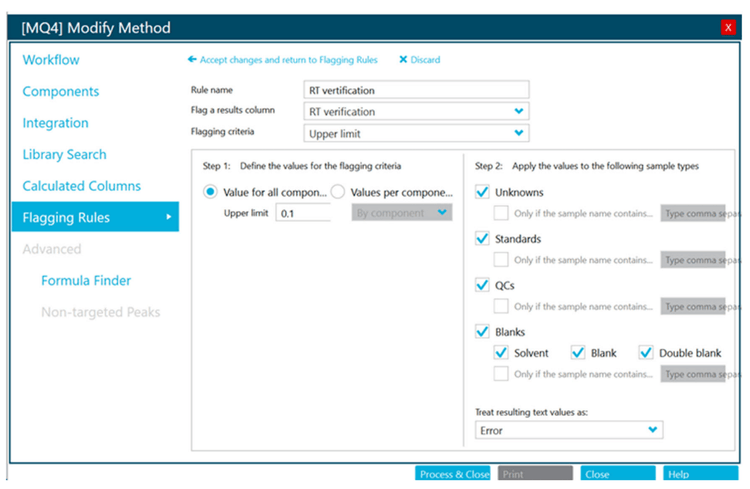
EPA Method 1633 specifies that the retention time (RT) for all target analytes with exact corresponding stable-isotope analogues must be within ± 0.1 min of the associated extracted internal standard (EIS). This criterion is applicable to 24 out of the 40 target PFAS compounds.
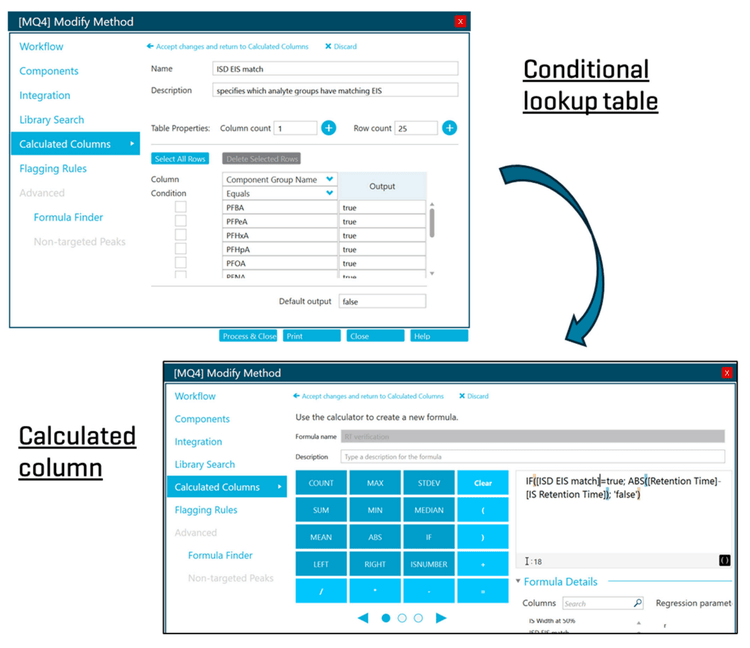
Step 1. A conditional lookup table is created under the Calculated Columns pane (Add > Conditional lookup). The “Component Group Name” and “Equals” are specified under the “Column” and “Condition” headings, respectively. The PFAS compounds with exact EIS matches are manually entered. The “Output” column is entered as “true”, “Default output” is “false” (or left empty). This table creates a new results table column (“ISD EIS Match”) which identifies PFAS analytes with exact EIS matches as “true” and is used in Step 2 for the RT verification calculation (Figure 5).
Step 2. In the Calculated Columns pane, the equation is entered to calculate the analyte RT and the EIS RT difference, if the EIS is an exact match (indicated by “true” in the “ISD EIS Match” column). The output column is “RT verification” (Figure 5).
EPA 533: Laboratory fortified sample matrix (LFSM) recovery
Laboratory fortified sample matrix (LFSM) recovery. EPA Method 533 specifies that at least one LFSM sample must be prepared with each extraction batch (section 9.2.6). For spikes at concentrations ≤2x of the minimum reporting level (MRL), the LFSM recovery must be within 50-150% of the true value, whereas, spikes at higher levels must be within 70-130%. An important note is that the fortified samples must be corrected for the PFAS levels in the unfortified samples. The LFSM recovery is calculated by the equation:
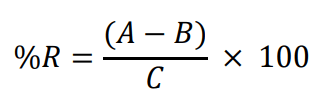
Where,
A = measured concentration in the fortified sample,
B = measured concentration in the unfortified sample, and
C = fortification concentration.
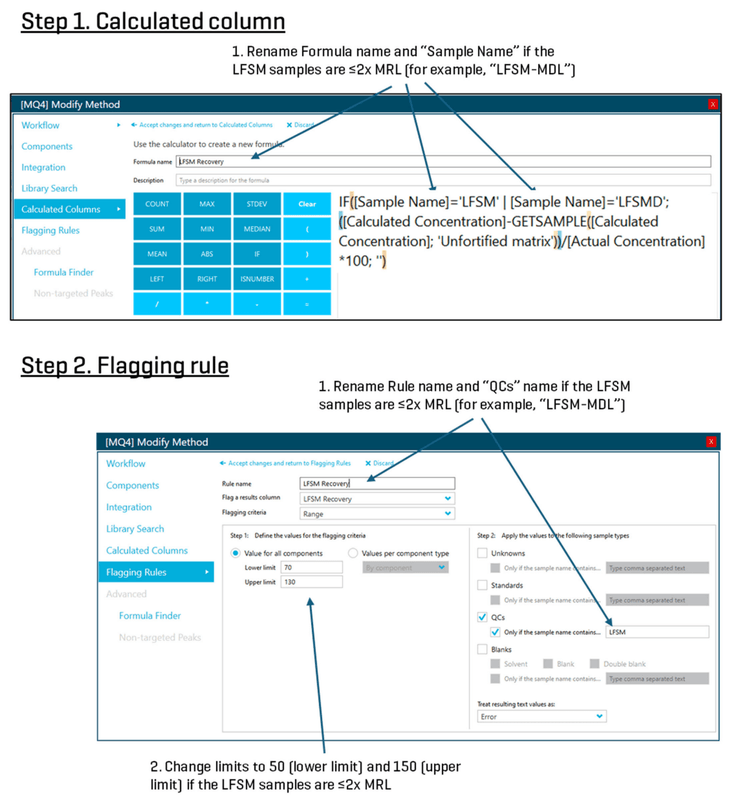
Step 1. In the Calculated Columns pane, the equation is entered for the LFSM recovery using the IF function to apply the calculation to LFSM samples only, and the GETSAMPLE function which pulls in the analyte concentration in the unfortified sample only. LFSM samples are designated as QC samples and the spike concentration is set as the actual concentration. The unfortified sample is treated as an unknown. Since the LFSM recovery criteria differ depending on the spiking level, the LFSM sample name needs to be specified, such as“LFSM-MDL” and “LFSM” to distinguish between the LFSM spiked at near-MDL and higher levels (Figure 7).
Step 2. In the Flagging Rules pane, custom rules are added to flag instances where the LFSM recovery is outside of the 50- 150% criteria for LFSM samples ≤2x MRL and outside of the 70- 130% criteria for higher level spikes (Figure 7).
EPA 533: Continuing calibration check (CCC) flagging
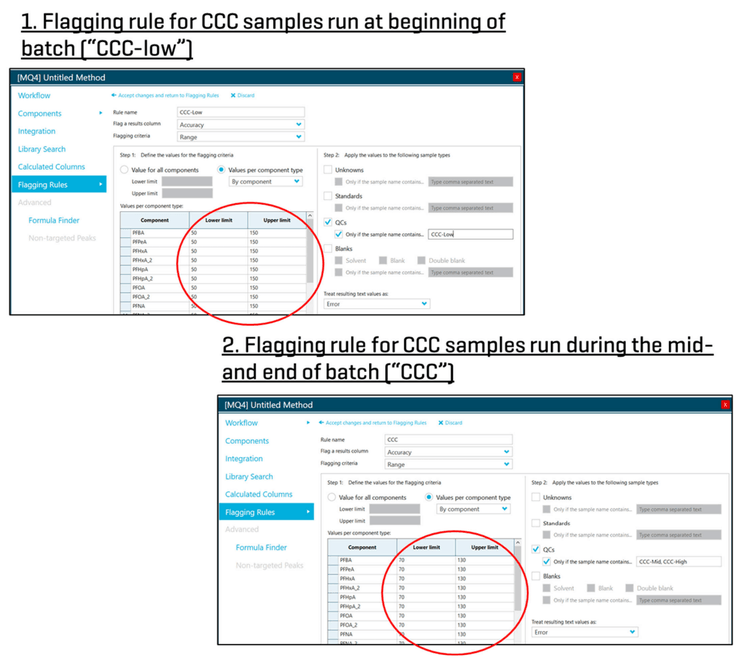
EPA Method 533 specifies that CCC standards must be analyzed at the beginning and end of each analysis batch and after every tenth field sample (section 10.4). The purpose of the CCC QC samples is to verify the existing calibration accuracy. The CCC at the beginning of the batch must be at, or below, the MRL for each analyte, and the accuracy must be within 50-150% of the true value. The remaining CCCs in the batch may be between the mid and high calibration levels, and the accuracy must be within 70-130%.
Step 1. Since the quality control criteria are different for the beginning CCC (“CCC-low”) and remaining CCCs, unique flagging rules must be created (Figure 8).
Step 2. In the Flagging Rules pane, custom rules are created to flag instances where the CCC accuracies are outside of the specified criteria (Figure 8). “Accuracy” is selected as the “Flag a results column”, and the “Flagging criteria” is “Range”. Depending on the specific CCC type, the lower and upper ranges are entered. Finally, the “QCs” box is checked under the sample type option and the appropriate CCC sample names are entered (either “CCC-Low” or “CCC-Mid” and “CCC-High”).
Conclusion
- QC calculations for the EPA methods 533 and 1633 can be built directly within SCIEX OS using the Calculated Columns feature in the processing method
- Ability to perform custom calculations within the SCIEX OS software remove the need to validate calculations performed in third-party software
- Custom Flagging rules allow the user to rapidly identify samples that are outside of the EPA criteria
- Time for data processing and review saved through formulating QC calculations and flagging rules directly within the SCIEX OS software
References
- Method 533: Determination of per- and polyfluoroalkyl substances in drinking water by isotope dilution anion exchange solid phase extraction and liquid chromatography/tandem mass spectrometry. U.S. Environmental Protection Agency, Office of Water (MS-140), November 2019. EPA 815-B-19-020.
- Method 1633. Analysis of per- and polyfluoroalkyl substances (PFAS) in aqueous, solid, biosolids, and tissue samples by LCMS/MS. U.S. Environmental Protection Agency, Office of Water (4304T), Office of Science and Technology, Engineering and Analysis Division, Washington, DC, January 2024. EPA 821-R24-001.
- EPA method 533 for PFAS analysis in drinking water at low parts-per-trillion level. SCIEX technical note, 2021, RUOMKT-02-12843-A.
- Analysis of per- and polyfluoroalkyl substances (PFAS) in aqueous, solid, biosolid and tissue samples following EPA method 1633. SCIEX technical note, 2023, MKT-29278-A.