AB Sciex is doing business as SCIEX. © 2010-2019 AB Sciex. The trademarks mentioned herein are the property of the AB Sciex Pte. Ltd. or their respective owners. AB SCIEX™ is being used under license. Beckman Coulter® is being used under license. Product(s) may not be available in all countries. For information on availability, please contact your local representative. For research use only. Not for use in diagnostic procedures.
For research use only. Not for use in diagnostic procedures.
In drug discovery and development, sensitive, automated and rapid quantitative assays for drug-like molecules, which address the demands of fast-turn results in a high-throughput LC/MS drug candidate screening process, are increasingly prevalent.
DiscoveryQuant Software addresses these challenges in a comprehensive workflow. Compatible with all SCIEX Triple Quad, QTRAP, and TripleTOF systems, DiscoveryQuant Software reduces tedious LC/MS method development time with a fast, robust, and reliable process that optimizes methods for hundreds of small and/or large molecules.
DiscoveryQuant™ Software significantly improves turn-around times in drug candidate analysis for high-throughput early ADME. It increases productivity by simplifying and expediting LC–MS method development cycle time for sensitive and selective bioanalytical assays, without compromising data integrity.
As a full-featured solution, DiscoveryQuant Software delivers fast, robust and reliable processing power for every aspect of the high-throughput quantitative workflow, from compound optimization to sample analysis.

Give your LC-MS method development a boost with a fast, robust and reliable processes that optimizes methods for hundreds of small and/or large molecules. You will have the ultimate confidence in your high-throughput analysis, without compromising data quality.
DiscoveryQuant will keep you on track as you optimize and verify compound MRMs on column with the ChromaTune workflow. It provides quick review data screens to increase the efficiency of the workflow, each step of the way.
Automated MRM tuning and optimization enables you to yield multiple MRM conditions for the most sensitive quantitative assay development, eliminating the time-consuming task of manual compound parameter optimization.
Transition seamlessly from traditional small molecule method development to biotherapeutic assays, and leverage combined workflows that can optimize and analyze a variety of molecule types. You can also visualize all injections from your study on a single plot to improve trend analysis, and customize tables to suit different reporting formats.
Save time and reduce redundancy with a single software solution that can be utilized in any lab across your organization to improve method consistency, from discovery through to development.
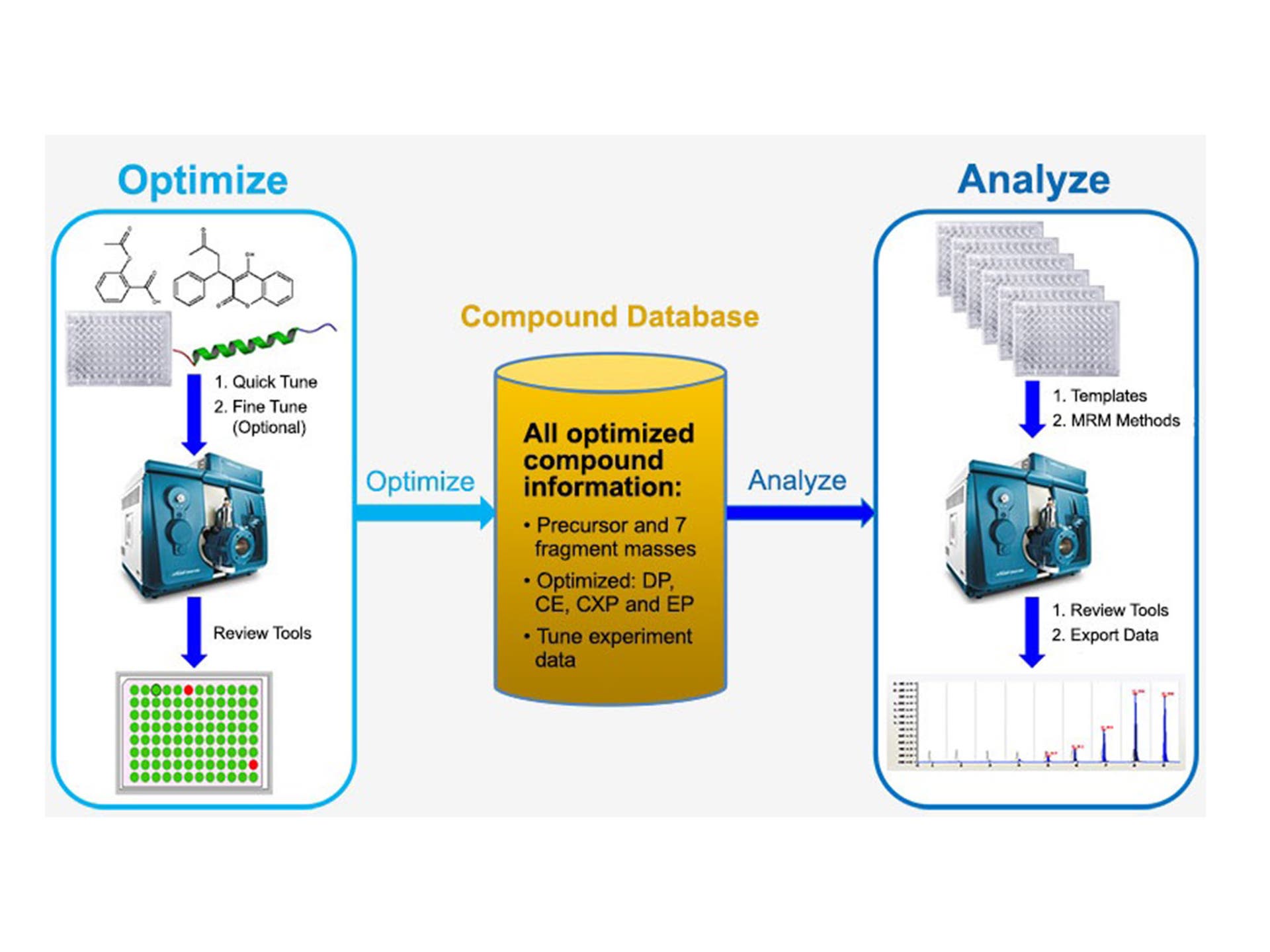
The Optimize module within DiscoveryQuant Software allows users to enhance compound dependent parameters for up to 7 MRM transitions via flow injection analysis, it also populates a database with these parameters. By automating and streamlining data analysis for hundreds of small and/or large molecules, you can cut your typical compound tuning and optimization time down to an impressive 30 secs per compound.
The ChromaTune feature automates on-column MRM verification by enabling sample analysis on multiple column chemistries and gradient conditions during the earliest phase of MRM optimization, which helps identify interferences and reduce failures in complex matrices before real-sample analysis downstream.

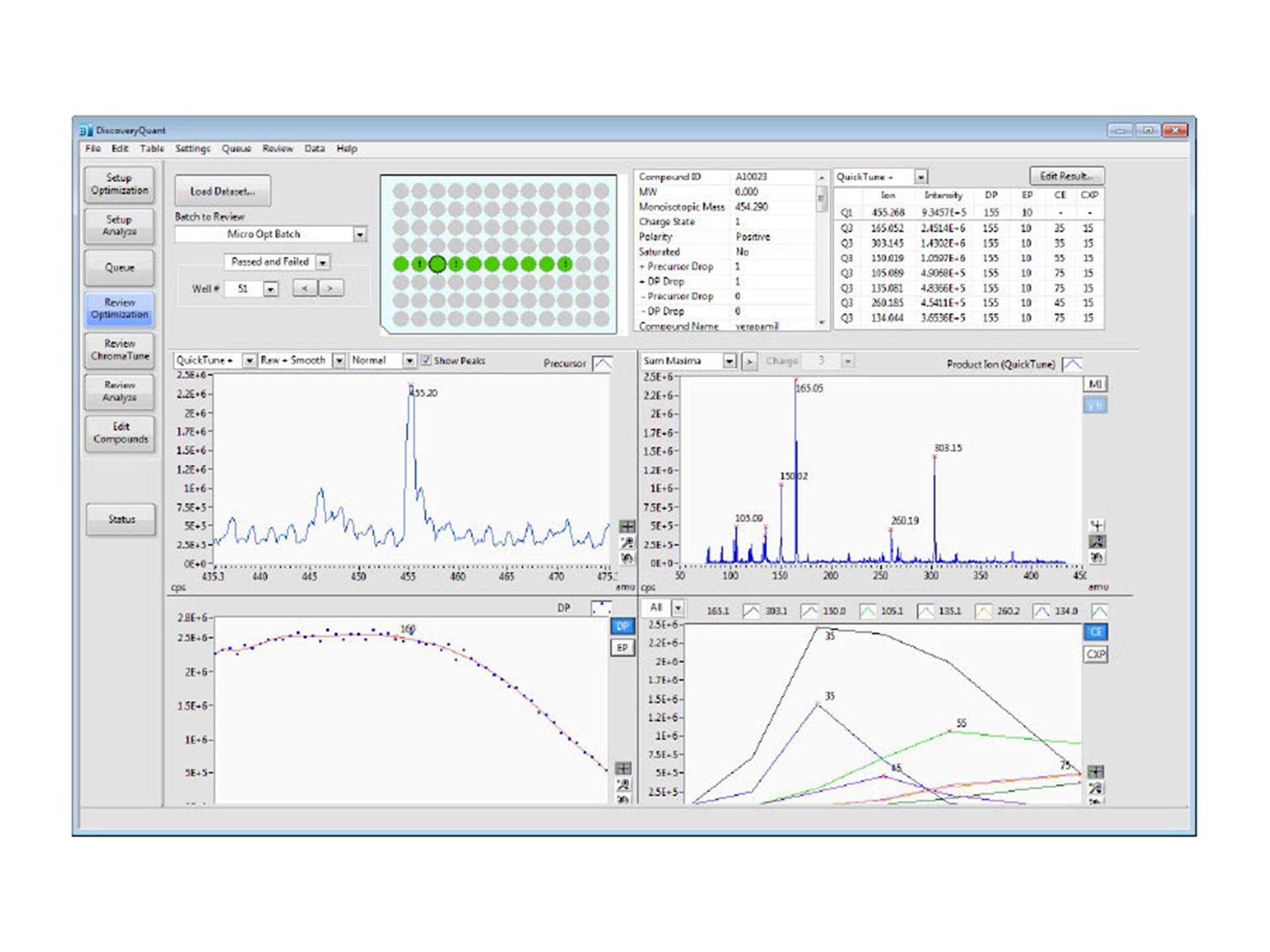
Optimize review

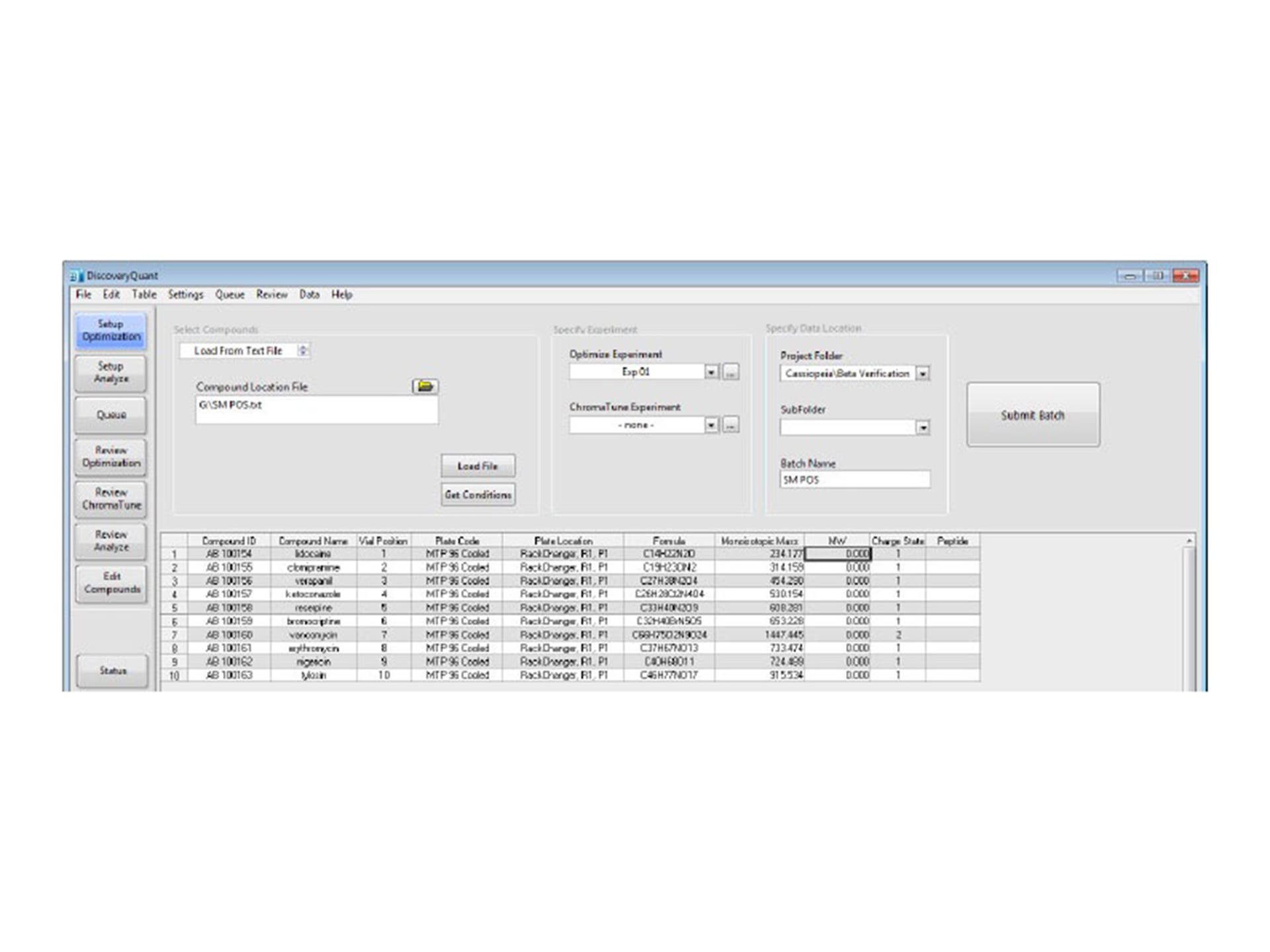
Optimize batch setup

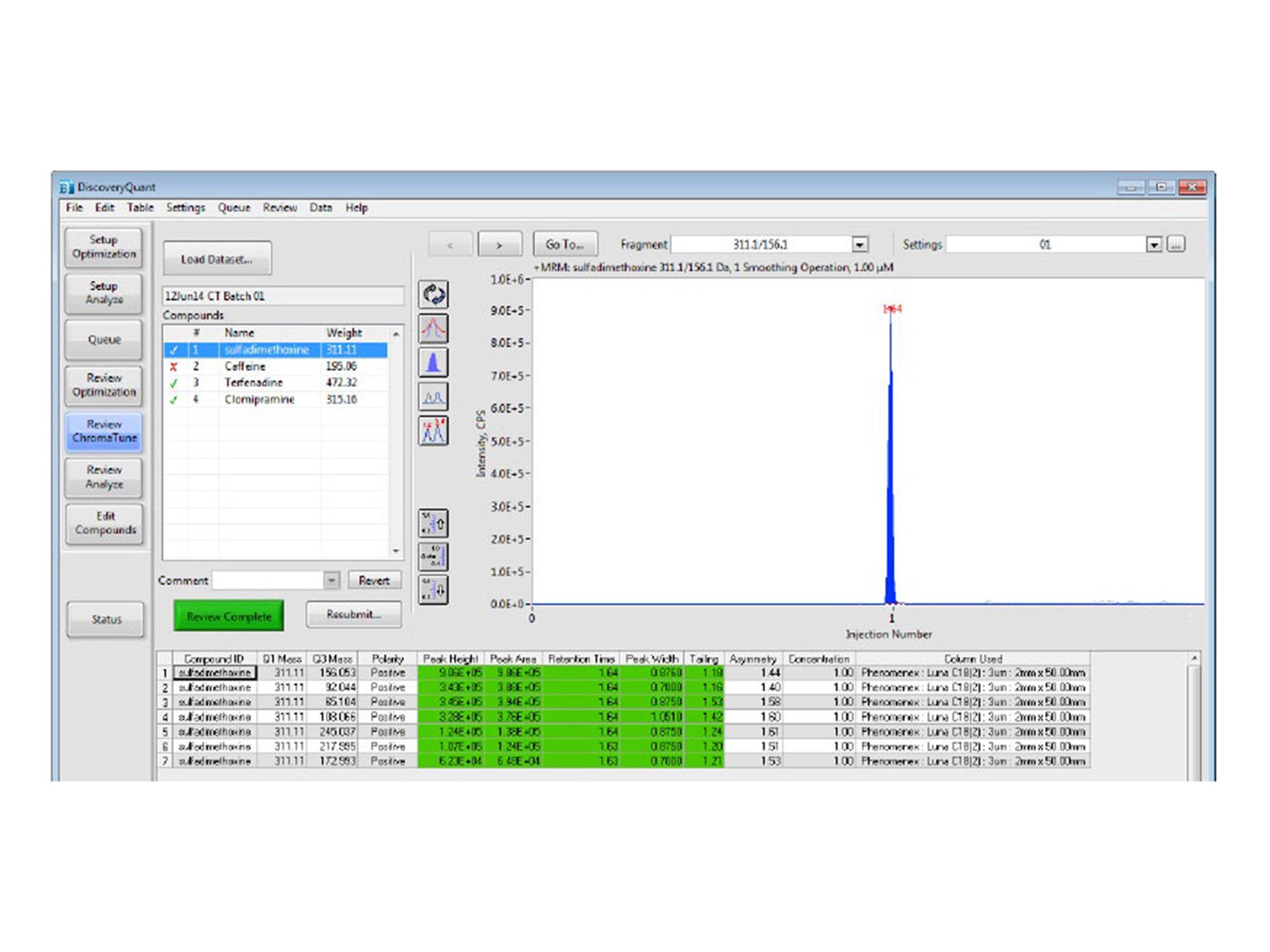
ChromaTune review screen

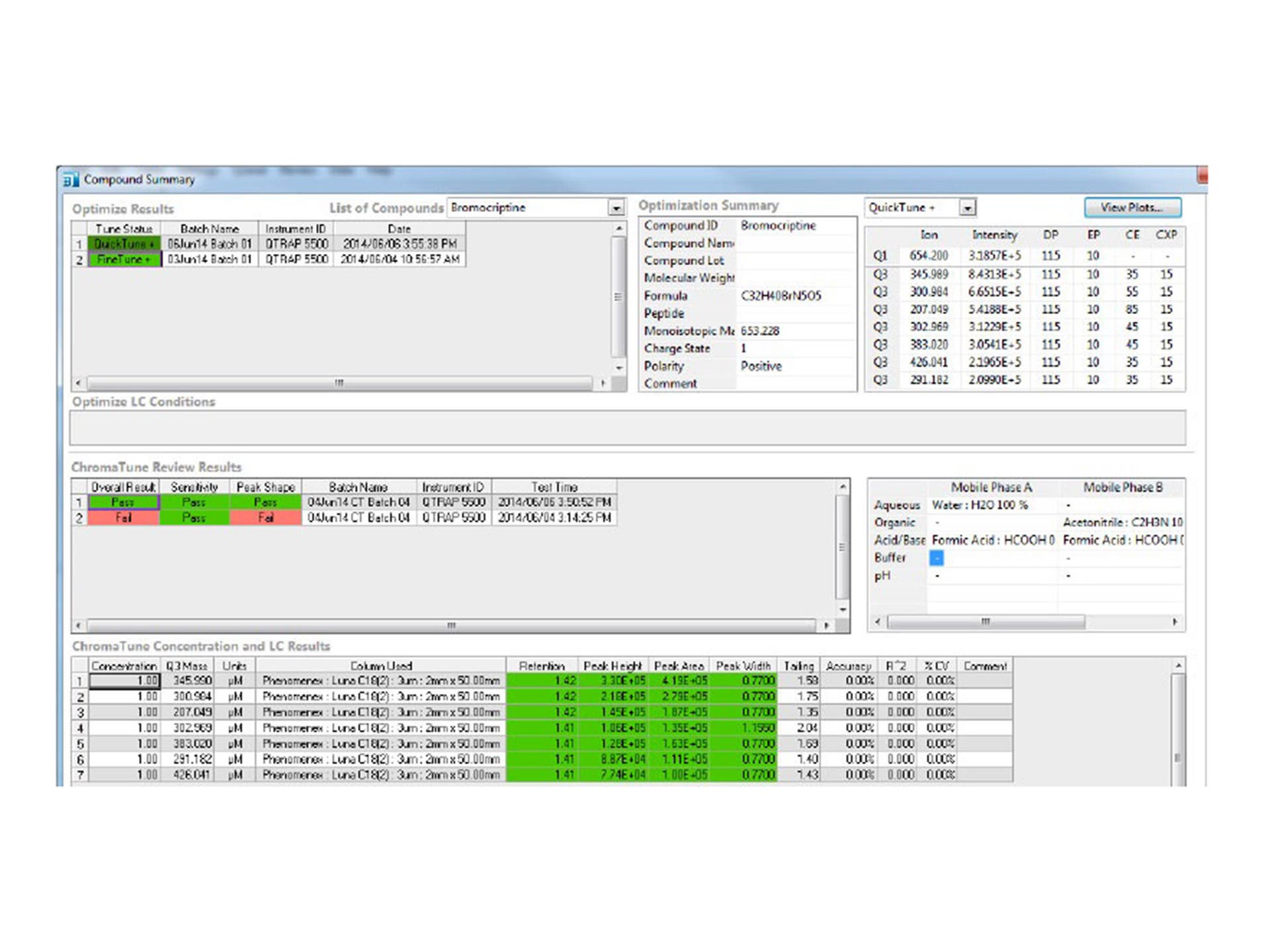
Compound summary screen showing tuning and on column results
Bioanalytical scientists are challenged to develop sensitive and selective assays for both small molecule drugs and peptide and protein based biotherapeutics in complex biological matrices. Manual compound parameter optimization is very time consuming, particularly for multiple charge states/peptides, and has a direct impact on lab output.
DiscoveryQuant Software enables precision in peptide MRM optimization by using real time peptide y- and b- ion labeling for sequence confirmation, and can handle custom amino acid side chain modifications with the new peptide editor. The ChromaTune feature automates on-column MRM testing, enabling sample analysis during the earliest phase of MRM optimization. This helps to identify interferences and reduce failures in complex matrices before real-sample analysis downstream. The result is a highly sensitive and selective quantitative LC-MS/MS method for your small molecule drug or biotherapeutic, that has been fully tested and confirmed.

Peptide results with y and b labels
DiscoveryQuant Software is a single software solution that can be utilized in any SCIEX LC-MS lab across your organization to ensure method consistency throughout – the ideal solution for a globally connected discovery environment with multiple labs and multiple sites. With compound library storage that enables you to share and retrieve your material from a structured environment, you can easily export your data to a LIMS system to generate final reports and share information across multiple labs.

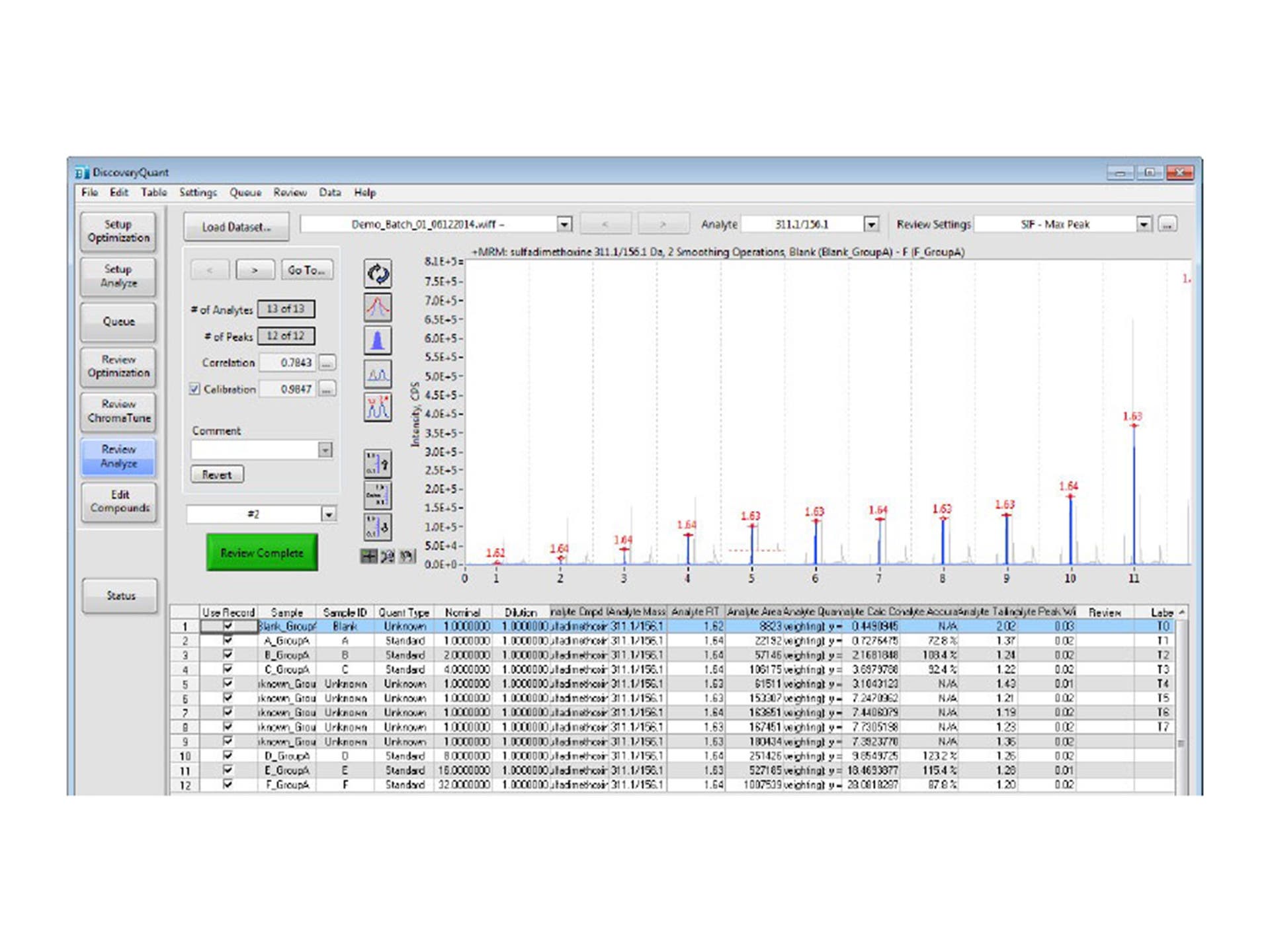
Analyze data screen

Discovery labs continue to search for ways to improve efficiency to address the demands of fast turn-around times required in the drug candidate screening process. Our goal is to offer best-in-class system solutions and DiscoveryQuant 3.0 Software in combination with our LC/MS platforms stays true to that, as it provides scientists with the ability to rapidly develop methods for all molecule types, in a high throughput environment.
Mark C Woodward
Need help? SCIEX Support is here to help you to resolve issues immediately or answer any questions.


Experience all the benefits of DiscoveryQuant Software in a free trial, and never look back.
Running the latest and greatest DiscoveryQuant Software is easier and more affordable than you think.
New to DiscoveryQuant Software and not sure where to start? Sign on to SCIEXUniversity to learn more.
RUO-MKT-18-2013-C
For research use only. Not for use in diagnostic procedures.
Designed to ensure your success: DiscoveryQuant 3.0.1 Software offers rapid and automated optimization of multiple MRM conditions for your sensitive quantitative assay development needs. DiscoveryQuant supports method development and optimization for HT-ADME screening studies to select new drug candidates and offers high quality data with fast turnaround results for screening hundreds or thousands of compounds. This is all achieved with a single software program, comprising DiscoveryQuant Optimize and DiscoveryQuant Analyze.
Eliminate false positives: ChromaTune allows on-column MRM optimization to eliminate false positives with the ability to validate MRMs on column with QuickTune and FineTune. ChromaTune can screen compounds based on chromatographic properties, sensitivity, retention time, peak width and peak tailing, thereby offering a comprehensive compound summary panel for quick and easy review.
Succeed with small molecules and peptides: DiscoveryQuant supports HT-ADME screening for new biological entities and new chemical entities by improving the workflow for tuning and analysis of small peptides and large protein digests. Optimize fine tunes MRM conditions using real time labeling of y and b ions for even further confirmation. DiscoveryQuant also imports Skyline MRM transitions to its database for FineTune optimization.
Worry free integration: DiscoveryQuant 3.0 Software seamlessly integrates to MultiQuant 3.0.1 Software enabling enhanced batch processing for hundreds of samples with multiple MRM transition transitions to its database for FineTune optimization.
Intuitive interface and concise plate review: The graphical user interface of DiscoveryQuant Software has been designed to be intuitive and straight forward. It provides a full-featured solution to the discovery HT screening assay, plate-by-plate, compound-by-compound, and allows the drug discovery lab to meet its throughput objectives. DiscoveryQuant Software is built for speed, with quick review screens for clear optimization and assay results.
Time-saving templates: Choose your plate layouts from pre-defined templates so you can spend less time entering sample locations. Enter a few samples for a new plate and click "Propagate Groups" to auto-fill the rest based on the current, self-defined pattern. When you have plate after plate of samples to run, sample entry has never been easier, reducing the tedium typically associated with large-batch analysis.
Enterprise-wide solution: Use the global database support feature in DiscoveryQuant Software to store and share your mass spectrometry methods. Leverage the size of your organization to create greater sample capacity and productivity by drastically reducing redundant work. The software will automatically look for an existing method in the database before acquiring data to build a new one. Communicate with your preferred LIMS and also with your compound library to store data and share across the enterprise.
Save time: DiscoveryQuant Software has been conceived by experts in early-ADME drug discovery who understand the intricacies of this application. This software has been carefully designed to deliver high-throughput analysis, without compromising on the quality of the results; you will no longer sacrifice one for the other. Use a visual approach; create templates that can be used for frequently run studies, which include sample assignment, quantitative information and internal standard assignment.
Easy review, data analysis, and report generation: All injections from a study can be visualized on a single plot to improve trend analysis, and customizable tables allow tailoring of DiscoveryQuant Analyze to suit customer report formats.
RUO-MKT-18-2013-A
A new password has been sent to your email.
You have added a user.
This serial number could not be found. Would you like to submit the case anyway?
Your password has been updated.
Your account is now created.
A verification link has been sent to your email.
A new password has been sent to your email.
Your insturment has been removed.
Your privacy settings are now updated.
Software has already been registered to another instrument. Please check your AID and try again.
If you want to change the License Key to another instrument, please submit a new case.
Software has already been registered to the instrument selected.
Please check your instrument's software by going to the Instruments page and selecting the instrument in your "My Instruments" section. Here you will see a Software tab where you can view your instrument's software information.
You can also go to the Registered Software page to view software associated with your instrument(s).
If you are not finding what you are looking for, please submit a new case.