AB Sciex is doing business as SCIEX. © 2010-2019 AB Sciex. The trademarks mentioned herein are the property of the AB Sciex Pte. Ltd. or their respective owners. AB SCIEX™ is being used under license. Beckman Coulter® is being used under license. Product(s) may not be available in all countries. For information on availability, please contact your local representative. For research use only. Not for use in diagnostic procedures.
MarkerView Software is a powerful data visualization program designed for scientists like you who wish to visualize their data in terms of sample groupings and apply minimalistic statistics in order to gain valuable insight into any trends within your mass spectral data. MarkerView Software gives you the ability to explore statistical correlations with direct connections back to the raw data from your SCIEX Mass Spectrometer. This allows you to find meaningful statistically relevant relationships much more quickly.
Designed with non-statisticians in mind and intuitively developed, MarkerView™ Software does the heavy lifting so you can focus on high-value decisions like reviewing trends and differences in targeted/untargeted mass spec workflows. Distil complex datasets quickly, find statistically significant differences and reveal key insights faster. What’s New in MarkerView Software 1.3.1 >
Interrogate your data with powerful statistical tools, such as Principle Components Analysis (PCA), Principle Components Variable Grouping (PCVG) and T-tests.
Find significant trends and differences to get to your biological answers easily. MarkerView Software enables you to interpret your results through intuitive and interactive plots.
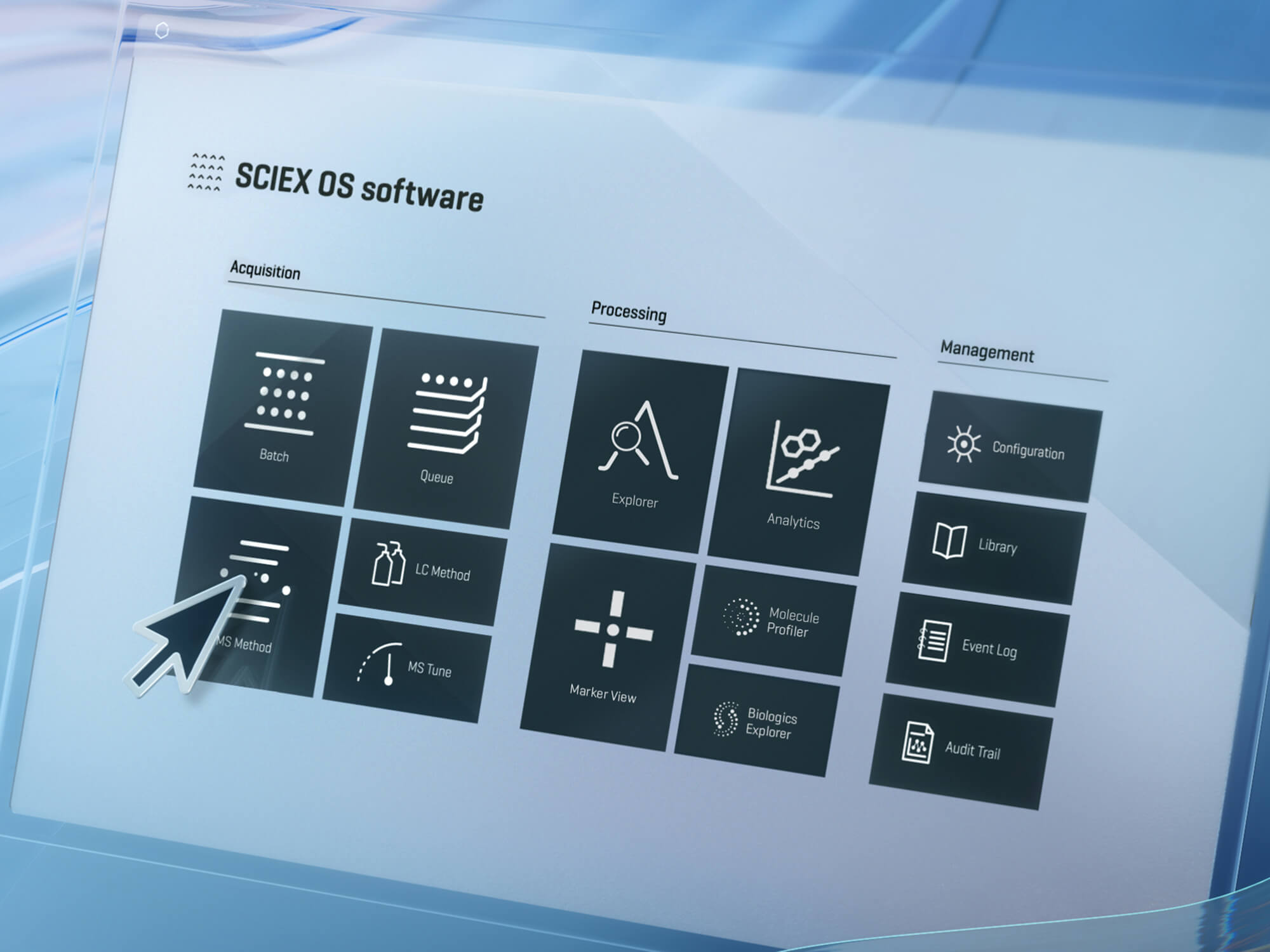
Directly import your processed results from SWATH® Acquisition 2.0, LipidView™ Software, MasterView™ Software or SCIEX OS Software into MarkerView Software to generate meaningful results. Alternatively, you can process raw data to reveal significantly differentiated features within your data.
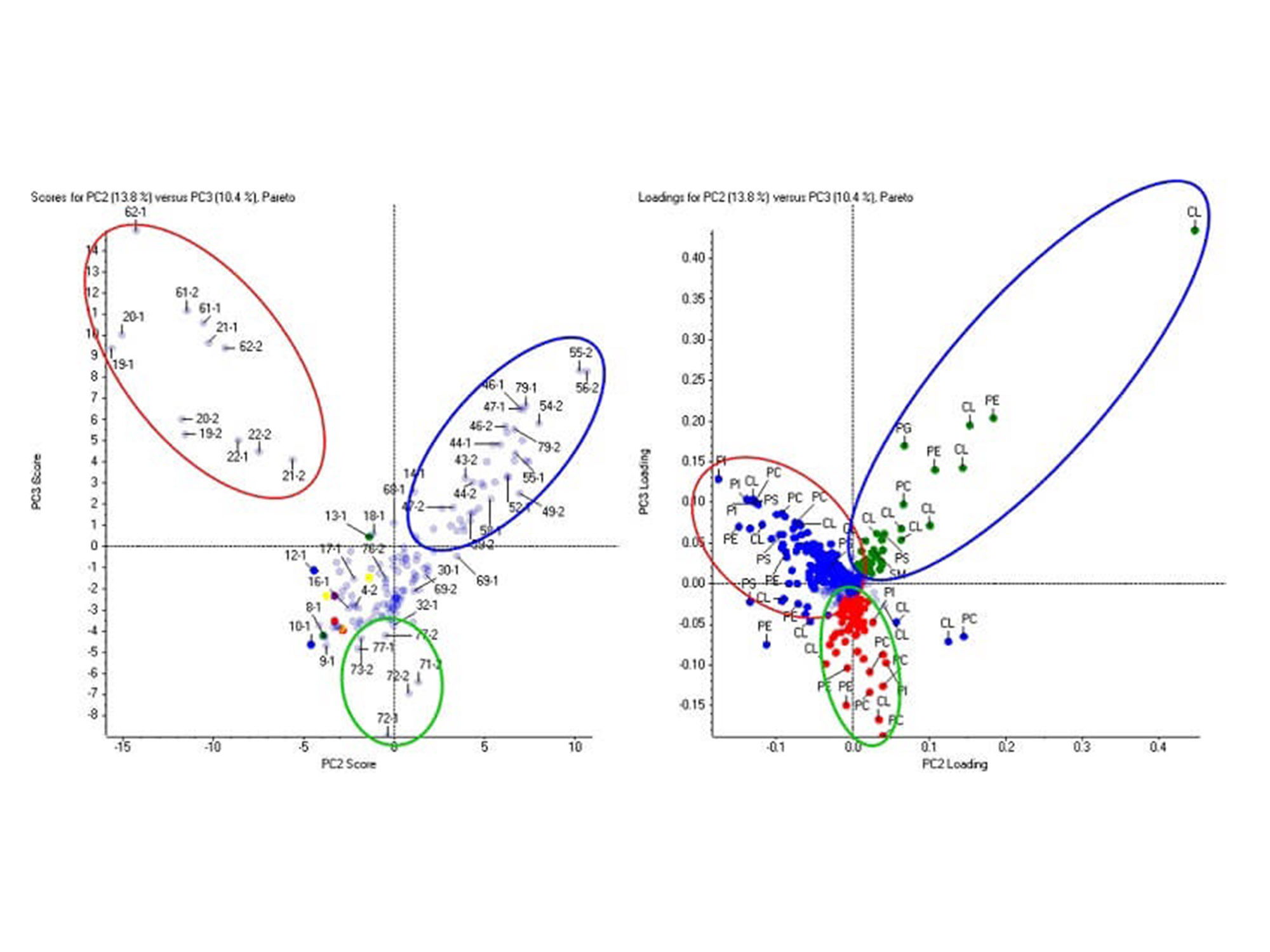
Lipids are efficiently identified and quantified in LipidView Software. After which, lipid expression trends can be visualized across all biological samples using Principal Component Analysis (PCA) in MarkerView Software. The principal component variable grouping (PCVG) clusters lipids according to its similar quantitative profiles.

Comparative Lipid Profiling in MarkerView Software. The phospholipids and cardiolipins (loadings plot, right) differentiate the three groups of samples (scores plot, left). This data was collected on the TripleTOF® 6600 system from a lipidomics profiling study.
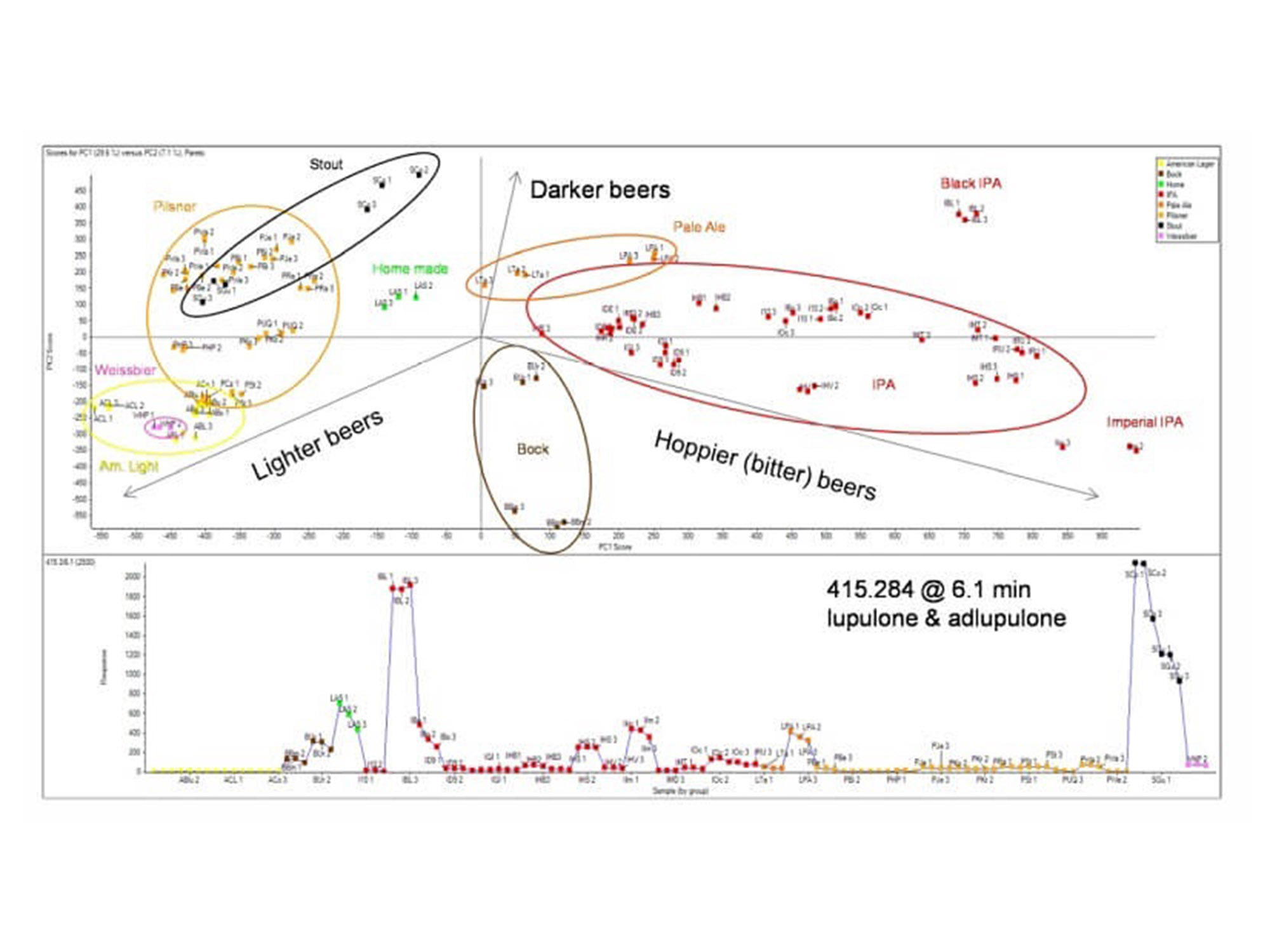
General unknown screening using an untargeted data dependent approach (IDA), allows researchers to profile large numbers of components across samples to characterize differences. This workflow was used to profile the differences between 40 commercially available beers.
Principal Components Analysis: The image above shows PCA scores plot beers of different styles clustering based on similarities in quantified features. Beers were differentiated from each other based on the hop content. The b-acids lupulone and adlupulone were found in higher concentrations in darker beers, such as stout and black IPA, as the profile plot (bottom trace). This data was collected on the X500R QTOF system.
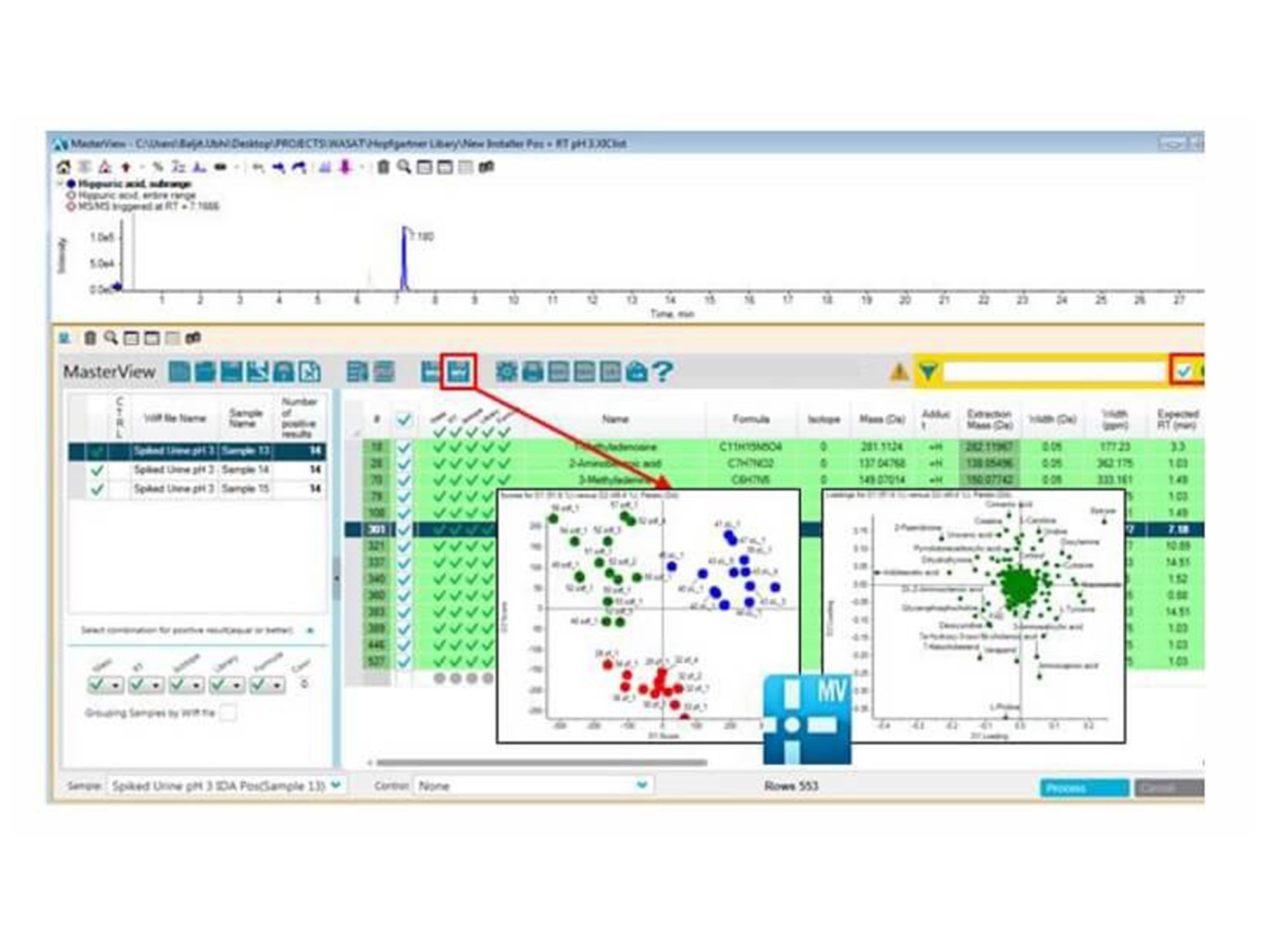
Use library searching to quickly identify metabolites first then perform principal component analysis on the known species to drive your biological interpretation faster. Easily employ t-test analysis and rank significantly differential metabolites by p-value.
The transition from MasterView Software for Statistical Analysis. Metabolites are identified and quantitated using the accurate mass metabolomics spectral library in MasterView Software. Three different phenotypes from the Zucker rat model were differentiated based on their metabolic profiles using a data independent technique known as SWATH Acquisition. This data was collected on the TripleTOF® 5600+ system analyzing extracted plasma.
In-depth analysis of SWATH proteomics data using SWATH Acquisition 2.0 confirms and quantifies many proteins and peptides across many samples. This feature table is then directly exported to MarkerView Software for statistical analysis, using visualizations like PCA/PCVG and T-tests.
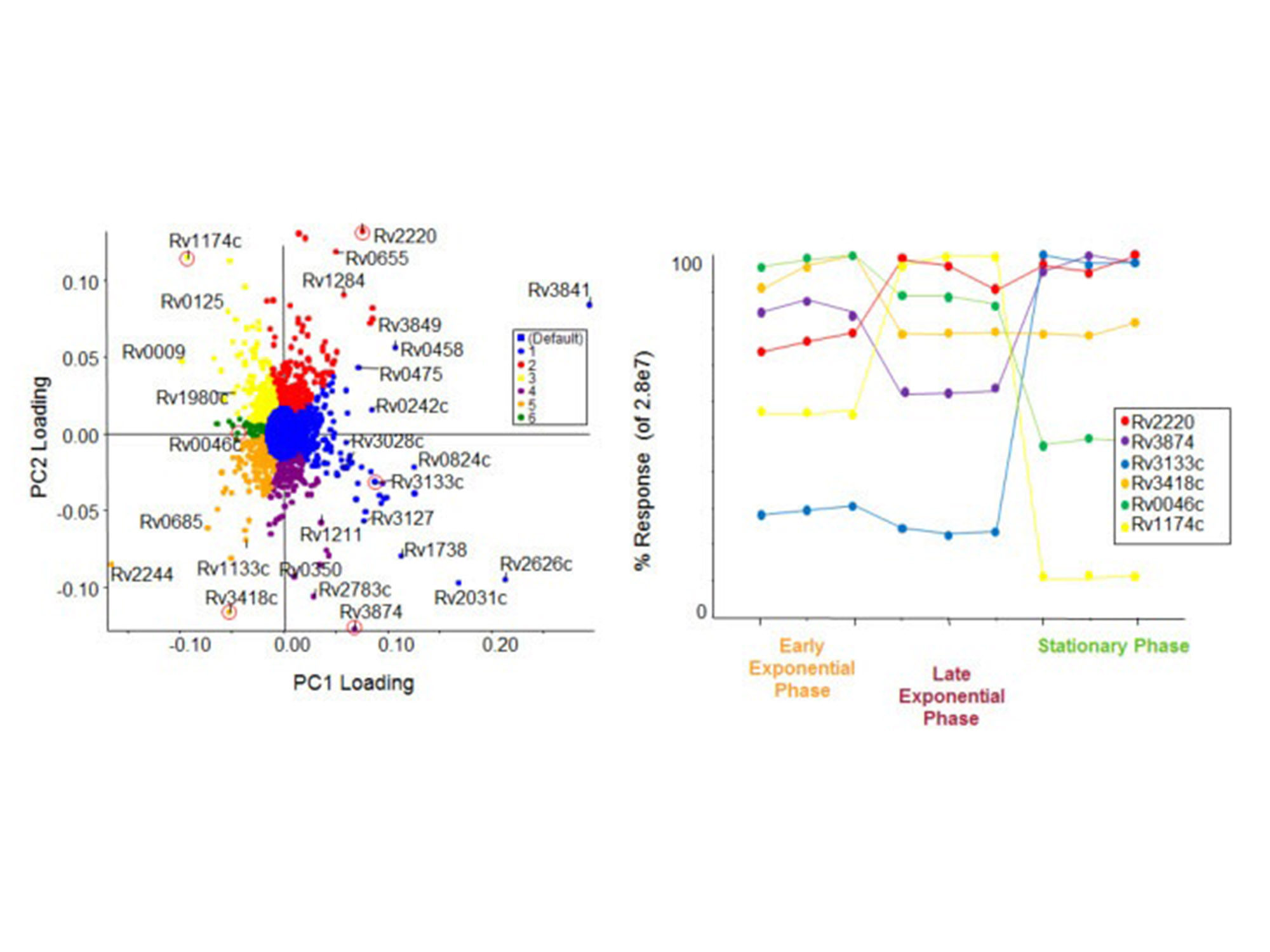
Trend Analysis from SWATH Proteomics Data. Using MarkerView Software, PCA analysis was used to determine the differences between proteins based on growth states of M. tuberculosis. PCVG was then performed to determine proteins with similar behavior, as shown by the colors on the loadings plot (left). Representative proteins (circled in red) from each PCVG group were selected, and the protein pattern was extracted to illustrate the protein expression changes (right). This data is collected on the TripleTOF® 5600+ system on protein extracts from bacteria.
My laboratory is using MarkerView 1.3.1 Software for lipidomic data analysis from infusion MS/MSALL workflow. It is an integral part of our workflow as it allows us to do basic data analysis, PCA, and lipid naming, or more advanced data analysis through the data export function.
~Jeff McDonald,
University of Texas Southwestern Medical Center
The software is compatible with all SCIEX mass specs instruments and supports. wiff and *wiff2 formats and infusion MS/MSALL workflow.
RUO-MKT-18-4043-C
For research use only. Not for use in diagnostic procedures.
Highlights of the Latest Version
Get the Wizard! – If you’re upgrading from an older version or a new user, you will find MarkerView Software and its ‘Import Wizard’ functionality highly intuitive, requiring less effort to remember pull down menus and steps between screens. MarkerView’s Import Wizard is a guided workflow tour, requiring less knowledge and skill.

T-Test View – This new feature provides an additional “common” view which is less cumbersome and more productive. Previous versions require more steps and user intervention, including the need to sort on “P” value, look at the top rows, click on a circle and a table of numbers. With the new T-Test View, there is lessjumping around and manual user intervention, making the entire process more productive.
Box & Whiskers Plots – This is a new feature and standard functionality for data analysis when comparing two samples that are frequently taken at different times. When measuring biological samples from two cell lines or subjects, they are used to plot differences between the samples. The workflow will clearly show the differences in a more standardized format which enables clear comparison and provides a more rigorous comparison view. Previous workflows only provide a bottom left quadrant making the judging process challenging for samples with subtle differences. The new Box & Whiskers Plotting functionality provides a standardized way of plotting data and best practices methodology for analysis used in many other applications.

Powerful statistical analysis tools: With MarkerView Software, you can process data acquired from non-classified workflows using Principal Component Analysis (PCA) or Principal Component Analysis-Discriminant Analysis (PCA-DA). This method compares data across multiple samples, reveals any trends amongst the data, and graphically shows the groupings in a Scores plot. The Loadings plot provides valuable insight into the variables responsible for the sample clusters in the Scores plot and illustrates metabolites or biomarkers that being are up- or down-regulated. Principal Component Variable Grouping (PCVG) helps to discover relationships between peaks and assigns related peaks to specific groups, manually or automatically. To highlight relationships, these related peaks groups are displayed in different colors on the Loadings plot (see figure). The t-test statistical test is useful to compare two groups of samples and can help determine which compounds lead to significant differences between the groups.
Information-rich reports: MarkerView Software allows you to see the traditional Scores and Loadings plots generated from PCA and PCA-DA and generate profile plots to confirm the behavior of selected variables across all samples. Profiles can link directly to mass spectra and chromatographic data, providing you with a simple way to review multiple data files simultaneously and confirm correlations. During data review, MarkerView Software lets you create a list of potential biomarkers that can be annotated and used to generate a custom report based on criteria you specify. Figure 1: Principal Component Variable Grouping (PCVG). When using PCVG, MarkerView Software color codes variables in the Loadings Plot (right) that are related to one another, streamlining and simplifying processing.

RUO-MKT-18-4043-B
A new password has been sent to your email.
You have added a user.
This serial number could not be found. Would you like to submit the case anyway?
Your password has been updated.
Your account is now created.
A verification link has been sent to your email.
A new password has been sent to your email.
Your insturment has been removed.
Your privacy settings are now updated.
Software has already been registered to another instrument. Please check your AID and try again.
If you want to change the License Key to another instrument, please submit a new case.
Software has already been registered to the instrument selected.
Please check your instrument's software by going to the Instruments page and selecting the instrument in your "My Instruments" section. Here you will see a Software tab where you can view your instrument's software information.
You can also go to the Registered Software page to view software associated with your instrument(s).
If you are not finding what you are looking for, please submit a new case.